INITWIN · Editorial
Software & digital strategy
Electronic registry in a DMS: from simple archiving to full document control
Automation, traceability and document control
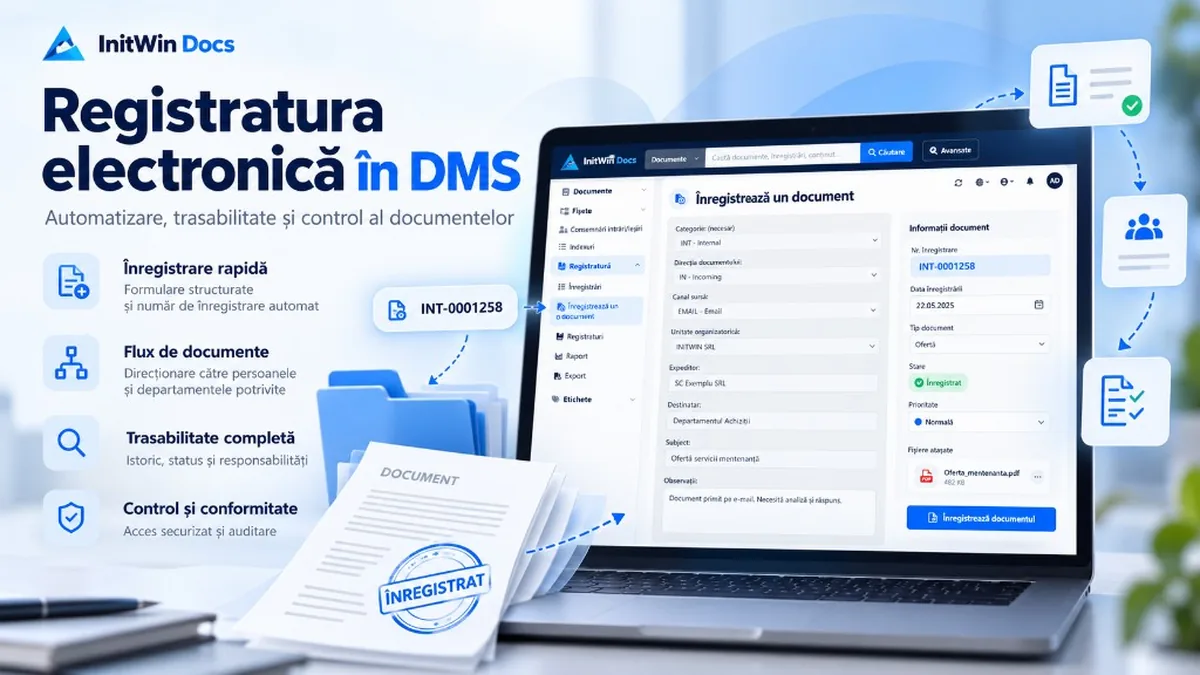
Automation, traceability and document control — from a digital archive to full management in a DMS.
In many organisations, documents are still managed through a mix of emails, shared folders, Excel files, paper registers and applications that do not talk to each other. A contract arrives by email, an official letter is scanned, an invoice is saved in a folder, and internal documents circulate between departments without a unified record. When the question arises — “Who received the document?”, “When was it registered?”, “What number does it have?”, “Who was it assigned to?” or “Which is the final version?” — the answer can take minutes or even hours of searching.
An electronic registry integrated into a DMS – Document Management System fundamentally changes this situation. The document is no longer just a file stored in a directory; it becomes an object tracked across its full lifecycle: receipt, registration, classification, assignment, processing, approval, archiving and retrieval.
For organisations that manage large volumes of documents, integrating the registry directly into the DMS can be the difference between a simple digital archive and a complete document management system.
What is an electronic registry?
An electronic registry is the system through which an organisation’s documents are recorded in a digital register and receive clear identification details.
A document may receive, for example, the number:
2967/EXT/29.09.2026
This can indicate that the document is registration number 2967, belongs to category EXT – external document – and was registered on 29 September 2026.
In other organisations, the format may be completely different:
00452/CONF/2026
or:
1285/INT/IN/29.09.2026
or even:
ACH/00258/2026
What matters is not a single universal format, but the organisation’s ability to configure its own numbering rules.
A modern electronic registry must allow the format to be defined without changing the application. The administrator can decide whether the number includes the counter, category, year, date, document direction or a service code.
This way, the registry can be adapted to how each company or institution actually works.
Why does integrating the registry directly into the DMS matter?
A registry separate from the document system solves only part of the problem. The number is recorded in one system, and the file is kept elsewhere. Over time, gaps appear between the register and the real documents.
Direct integration into the DMS means the registry number and the document are permanently linked.
When the document is registered, the system can save at the same time the number, date, category, sender, recipient, department, responsible person and the electronic document itself.
Afterwards, the user no longer searches separately in a register and an archive. They can search directly by “2967”, “EXT”, the sender’s name, the registration period or even by document content if the DMS offers OCR and full-text search.
This is one of the most important advantages of combining a registry with a DMS.
Configurable categories for different document types
Not all organisations classify documents the same way.
A company may use categories such as INT – internal document, EXT – external document, CONF – confidential document, CONTRACT, INVOICE or HR.
Another organisation may have completely different categories.
That is why, in a modern DMS, categories should not be hard-coded into the application. They must be administrable.
The administrator can create a new category, assign it a code, a name, a description, a default workflow or certain access rules.
If the organisation decides to introduce a new category, for example “LEGAL”, the application does not need to be modified and a new software version does not need to be released.
At the same time, categories used in the past must be kept for historical integrity. If a category is no longer used, it can be deactivated without disappearing from documents already registered.
Category, direction and channel are not the same thing
A well-designed registry must avoid mixing different concepts.
The document category may be, for example, “CONF – Confidential”.
The document direction may be “IN – Incoming”.
The channel through which the document arrived may be “EMAIL”.
In this case we have a confidential document received from outside by email.
This separation allows a much more precise record.
Documents can later be filtered by category, direction or channel. A manager can see, for example, all external documents received by email in a given period, or all confidential documents registered by a particular service.
From a reporting and automation perspective, this differentiation becomes extremely useful.
Automatic numbering and eliminating duplicates
One of the critical elements of a registry is numbering.
In a system used by several people at once, it is not enough for the application to read the last number and add one. If two users perform the operation at the same moment, both could receive the same number.
A serious implementation must use transactional mechanisms at the database level so that each number is assigned only once.
For example, if several operators register documents simultaneously, the system must generate:
2967, 2968, 2969, 2970
and never two documents with number 2967.
The organisation must also be able to decide the numbering policy. There may be a single counter for the entire registry, separate counters per category, or counters that reset annually.
In a register with annual reset, the last registration in 2026 may be:
7854/EXT/31.12.2026
and the first registration in 2027:
1/EXT/01.01.2027
Once a numbering policy is in use, it should preferably no longer be changed arbitrarily, because changing the rules during operation can affect the coherence of the register.
What if a registration is wrong?
An important principle of a registry is that an assigned number should not be reused.
If document number 2967 was registered incorrectly, the correct solution is not to delete it and assign the same number to another document.
The registration should be kept and marked, for example, as CANCELLED.
The next document receives number 2968.
This way, the sequence remains explainable and can be audited later. Authorised users can see who made the registration, when it was cancelled and the reason for cancellation.
This approach is much safer than the ability to rewrite history.
Organisational structure and document responsibility
The registry becomes even more useful when linked to the organisation’s structure.
The document can be associated with a directorate, a service, a department or a person.
For example:
Finance Directorate → Accounting Service → Ion Popescu
or:
Technical Directorate → Procurement Service → Maria Ionescu
At the moment of registration, it is immediately clear who entered the document and which structure is responsible.
It is important, however, that history is preserved. If a person later moves from Accounting to Procurement, documents registered earlier must continue to show the structure they belonged to at the time of registration.
For this reason, the system can keep both the link to the current user and a “snapshot” of historical information: the person’s name, service and directorate as they existed at that moment.
Access rights are essential
Not every user who can register a document should be able to create registers, categories or change the numbering policy.
A well-designed DMS must clearly separate rights.
The administrator can decide, for example, that a registry operator can enter documents and see certain registers, but cannot create new registers, change number formats or administer categories.
In addition, access can differ from one register to another.
A user may have access to the General Registry, but not to the Confidential Documents Registry.
This way, a very precise access matrix can be built based on roles, groups and permissions.
For organisations with sensitive documents, this separation is essential.
Electronic stamping of the document
After registration, the number can be applied visibly on the document.
On the first page there may appear, for example:
REGISTERED
No. 2967/EXT/29.09.2026
Finance Directorate
Accounting Service
A correct implementation should not destroy or overwrite the original document.
The DMS can keep the document exactly as received and generate a stamped copy separately.
This way both the original and the version used in the internal registry process always exist.
This model is important for document integrity and audit.
For PDF documents, the mark can be generated directly on the derived copy. For other formats, such as DOCX, XLSX or scanned images, the system can use conversion or a derived representation while still keeping the original file.
OCR and content search
A major advantage of a DMS is the ability to combine the registry with OCR – Optical Character Recognition.
A scanned document can be registered, classified and then OCR-processed. Its text becomes searchable.
The user no longer necessarily needs to know the exact registry number. They can search by a name, an address, a contract number or a term from the content.
Search can combine registry information with document text.
For example, you can search all external documents from September that contain the phrase “maintenance contract”.
This combination of metadata and full-text search is one of the biggest advantages of a DMS over a traditional folder system.
Workflows started automatically after registration
Registration does not have to be the end of the process.
It can even be the start of a workflow.
An external document can automatically follow the path:
Registered → Assigned → In progress → Approved → Completed → Archived
The document category can determine which flow should start.
A contract may go to the legal department, an invoice to accounting, and a request to the responsible service.
This reduces document circulation by email and makes the status of every document permanently visible.
Managers can identify documents waiting for a response, overdue documents or departments where work is piling up.
Documents received by email
A registry integrated into a DMS can also automate documents received by email.
Instead of an employee manually downloading every attachment, the document can be imported automatically.
The system can identify the source as EMAIL, assign the default category, create the registration and send the document into the appropriate flow.
Depending on organisational rules, automation can be complete or may require an operator’s validation before the number is assigned.
The same approach can later be extended to documents received through a portal, API, scanner or other systems.
Audit and traceability
One of the most important functions of an electronic registry is traceability.
For every important operation there must be a history: who registered the document, when the number was assigned, who changed the data, who cancelled a registration, who generated a stamped copy or who performed an export.
Audit is not only a technical feature.
It can answer very concrete operational questions.
When a document can no longer be found in a traditional system, a search through emails and conversations between employees often begins. In a DMS with audit, the document history can be followed directly.
Reports and export
An electronic registry also enables quick report generation.
Management can analyse the number of documents received in a month, distribution by category, activity per service, the ratio of incoming to outgoing items, or the status of documents still in processing.
Data can be filtered and exported, for example to CSV or PDF, depending on system features.
This way, the registry is no longer only a record-keeping tool, but also a source of information about organisational processes.
Multilingual support and international use
For companies working across several countries, the registry interface can be multilingual.
An administrator using the application in Romanian may see “Creare registru” or “Înregistrare documente”, while a user in English sees “Create registry” and “Register documents”.
Internal identifiers, however, remain the same.
A code such as CONF, INT or EXT must not change depending on the interface language.
Likewise, an official registry number such as:
2967/CONF/29.09.2026
must remain stable regardless of the user’s language.
From digital archive to document process platform
The difference between a simple electronic archive and a DMS with an integrated registry is significant.
The archive mainly answers the question:
“Where is the document?”
The electronic registry adds other questions:
“When did it arrive?”, “What number does it have?”, “Which category does it belong to?”, “Who registered it?”, “Who was it assigned to?”, “What stage is it in?” and “What happened to it from receipt until now?”
When all this information is linked to the document and can be searched, filtered and audited, the DMS becomes an operational platform.
Electronic registry in InitWin Docs
In a platform such as InitWin Docs, the registry can complement classic document management features with automatic numbering, configurable categories, direction and source channel, organisational units, access control, audit, workflows, metadata, stamping and automations.
The administrator can define different registers and decide exactly who has access to each of them.
For example, an organisation may have a General Registry, a Contracts Registry and a Confidential Registry, each with its own access and numbering rules.
Documents stay in the same system where they are searched, processed and archived — without parallel records.
Conclusion
An electronic registry in a DMS does not mean only replacing a paper register with a digital table.
Implemented correctly, it creates a controlled link between the document, the official registration number, the people involved, the organisational structure and internal processes.
Automatic numbering reduces errors. Access rights protect information. Audit provides traceability. Workflows automate document circulation. OCR and full-text search enable fast retrieval. And integration with email, APIs and other sources can turn a manual process into a coherent digital flow.
For organisations that manage contracts, letters, invoices, requests, internal documents or official correspondence every day, the combination of electronic registry and DMS can become one of the most important components of business digitalisation.
Instead of information being split across registers, emails, folders and physical documents, the entire circuit can be tracked in a single system: from the moment of registration through to final archiving.
Keep reading
- Cloud advantages for a company: why more and more businesses are moving their work to the cloud
- Avoid clients who want a lot and pay little in the software industry
- Why software projects exceed budget — 7 real causes and how to avoid them
- European funds for SME digitalisation in Romania 2026 — what you can access and how
Need guidance on a similar project or a technical audit?