INITWIN · Editorial
Software & digital strategy
Migrating a database without losing data: lessons from real projects
Backup, rollback and zero-downtime migration strategies for business applications
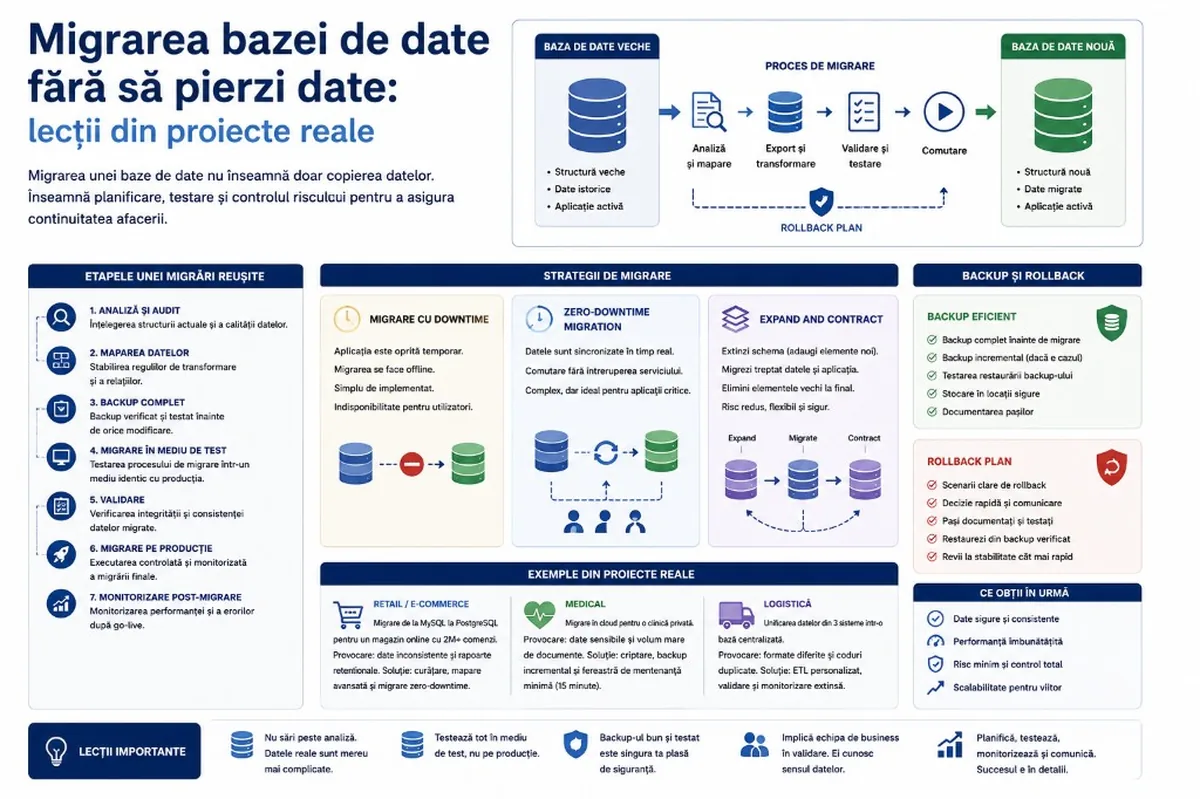
Backup, rollback and zero-downtime migration strategies for business applications — lessons from real projects on migrating a database without data loss.
Migrating a database is one of the most sensitive operations in a software project. For the end user, everything seems simple: the application should work the same as before, maybe even better. For the technical team, though, migration means planning, risk, testing, backup, synchronisation, validation and a clear rollback plan if something goes wrong.
A database is not just a place where information is stored. It is the application’s memory. There you find users, orders, invoices, contracts, documents, payments, activity history, settings, reports and many other critical data. If a migration is done superficially, the consequences can be serious: lost data, unavailable application, wrong reports, unhappy clients and high recovery costs.
A database migration should not be treated as a simple technical task. It is a project in itself.
Why do companies end up migrating their database?
Migration comes from several reasons: the application has grown and the old database can no longer cope; the company changes infrastructure (on-premise → cloud, provider → provider); modernising the application with unoptimised tables, duplicate data and missing documentation.
Other frequent reasons:
- moving from MySQL to PostgreSQL;
- migrating from a local database to the cloud;
- splitting a monolithic database into multiple services;
- unifying data from multiple systems;
- changing table structure;
- performance optimisation;
- introducing multi-tenancy;
- preparing for scale;
- new security or audit requirements.
Regardless of the reason, the goal remains the same: data moved correctly, application working, business as little affected as possible.
The main lesson: migration does not start with exporting data
One of the biggest mistakes is treating migration as an “export-import” operation. You export the old database, import it into the new one and check whether the application starts. In simple projects it may work. In real business applications, rarely.
A database can contain incomplete data, wrong relationships, fields used differently, manually entered values, old date formats, duplicates, orphan records or business logic hidden in the application. Migration starts with analysis — what data exists, what each table means, which relationships matter, what is active vs historical, what can be archived.
A good migration starts with questions, not with terminal commands.
Auditing the existing database
The first serious stage is the audit: tables, columns, indexes, constraints, relationships, size, volume per table, write frequency, important queries, application dependencies.
The audit often discovers problems invisible to the business:
- duplicate clients;
- orders without an associated client;
- invoices without a clear status;
- data in different formats;
- fields used for multiple purposes;
- old unused tables;
- missing foreign keys or indexes;
- reports based on unofficial rules;
- historical data with no operational value.
If they are moved without cleaning, the new system inherits the chaos of the old one. A migration is also an opportunity to sanitise the data.
Data mapping: how the old model becomes the new model
Mapping defines how data is transformed from the old structure into the new one. Example: `client_type` with values “PF”, “pj”, “companie” → standardised natural / legal person. Or an address in a single text field → country, county, city, street, number, postal code.
Mapping answers:
- which fields move directly vs are transformed;
- which data is normalised, removed or archived;
- what default values are used;
- how we treat missing data and duplicates;
- how we validate the result.
Weak mapping produces errors that are hard to notice: the application starts, but reports are wrong or filters incomplete.
Backup: the migration’s life insurance
No migration should start without a backup. If something goes wrong, the backup allows returning to a safe state. A good backup must be complete, verified and accessible — tested that it can be restored.
- full backup before migration;
- incremental backup if the system is active;
- separate backup for external files;
- verifying restore in a test environment;
- storage in a safe location;
- documenting the exact moment of the backup.
It does not only matter that you have a backup. It matters how quickly and safely you can return to it.
The test environment: where migration should fail first
A migration is not tested directly on production. In staging, as close as possible to production, the migration is run multiple times, duration is measured, scripts are adjusted.
In staging you check: complete import, correct relationships, application starts, correct reports, user authentication, linked documents, acceptable performance, repeatable scripts with logs.
Validating data after migration
A migration is not complete just because the script finished without an error.
Technical validation: record counts before/after, primary and foreign keys, null values, duplicates, totals, relationship integrity, samples, error logs.
Functional validation: client authentication, correct orders, associated invoices, reports, document download, statuses, permissions, activity history. Validation should be done together with business people — they know what the data means.
Rollback: the plan you hope not to use
The recovery strategy if migration fails. Without rollback, any major problem becomes a crisis. With rollback: you stop the process, return to the old database, restore the backup or redirect the application.
The plan must be set beforehand, not during the incident:
- In which situations do we activate rollback?
- Who makes the decision?
- How much time do we have?
- What steps do we execute?
- What happens to data written during migration?
- How do we inform users?
- How do we verify that the old system works again?
Migration strategies
| Strategy | Description | Suitable for |
|---|---|---|
| Migration with downtime | Application stopped, backup, migration, validation, restart | Internal, small projects, acceptable interruption |
| Zero-downtime | Copy history, sync changes, switch traffic, fallback | Marketplace, SaaS, orders, finance, logistics |
| Blue-green | Old environment active + new environment prepared, traffic redirect | Modern applications; watch data consistency |
| Expand and contract | Extend structure, gradual migration, remove old | Large changes without abrupt shifts |
Migration with downtime
The simplest: application temporarily stopped, backup, migration, validation, restart. Simplicity — no new data during the process. Disadvantage: costly unavailability for critical applications.
Zero-downtime migration
No visible stop for users. Steps: prepare new structure, copy historical data, sync changes, adapt application, switch traffic, monitor, fallback to old system. It does not mean no risk — it means managing risk through architecture, testing and monitoring.
Expand and contract
Expand: you add new columns/tables, the old application still works. Contract: after stabilisation, you remove the old elements. Avoids abrupt changes in a single night.
Monitoring after migration
The first hours and days are critical: errors, performance, logs, slow queries, resources, user feedback, business metrics. Sometimes problems appear late — a wrong monthly report, a rare flow with an error, a special role affected. For critical applications, the old system can stay on standby until full confidence.
Practical lessons from complex migrations
- Real data is always dirtier than it looks.
- The backup must be tested, not only created.
- Business people must be involved in validation.
- Rollback is planned before migration.
- Zero-downtime is not improvised — architecture, synchronisation, testing.
- Migration is a good moment for cleanup, but not an endless project — be clear what is cleaned now vs later.
- A successful migration is almost invisible to users — that calm is the result of planning.
Conclusion
Migrating a database without loss is both a technical and a strategic process: analysis, cleanup, mapping, backup, testing, validation, rollback and monitoring.
For small applications, planned downtime may be enough. For critical platforms: gradual synchronisation, expand and contract, blue-green or zero-downtime.
A good migration is not the one done quickly, but the one done in a controlled, tested way, with a plan for every scenario. When data is moved correctly, the application can move forward without interruptions, without losses and without costly surprises.
Keep reading
- How to prepare your team for new software: training, adoption and resistance to change
- The 8-week MVP: how to launch a product idea without burning the budget
- How we optimise the desktop of a software product
- Production application monitoring: how to know something broke before the client does
Need guidance on a similar project or a technical audit?