INITWIN · Editorial
Software & digital strategy
The stages of a software project: from idea to release — what happens behind the scenes
Guide for non-technical customers: discovery, design, development, testing, release and support
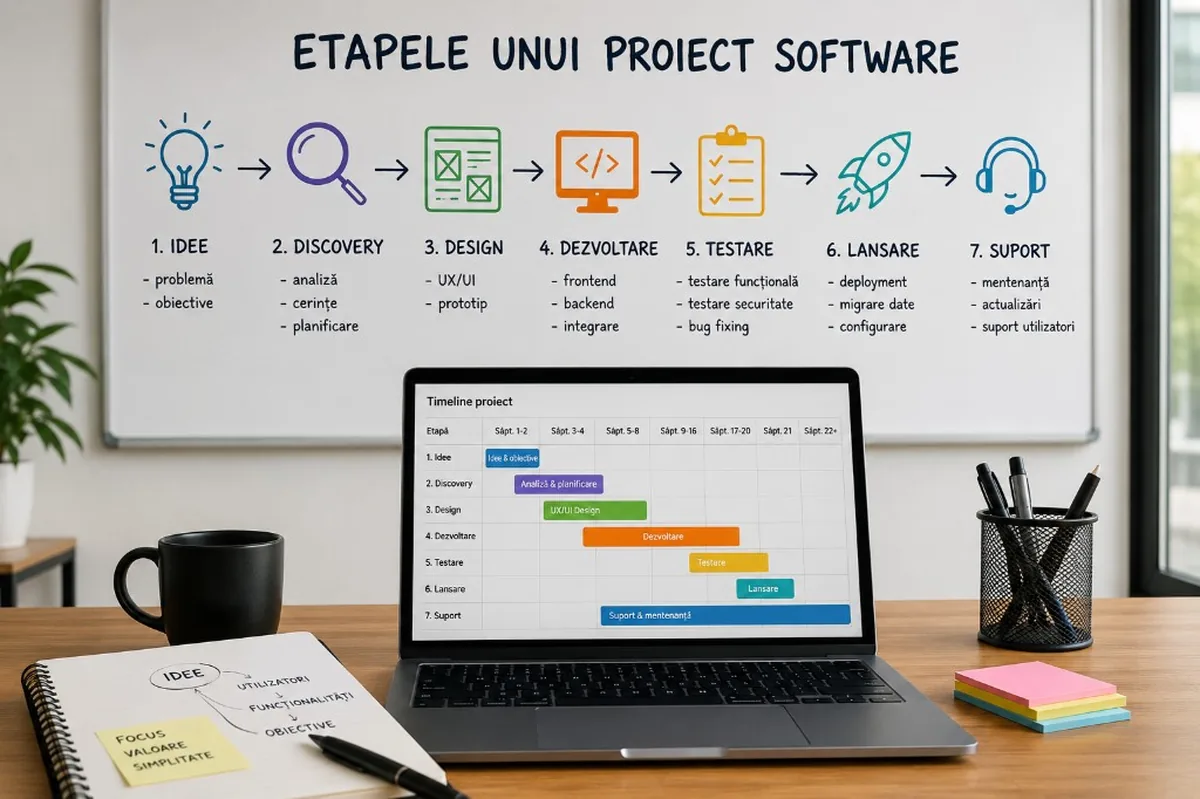
Guide for non-technical customers: discovery, design, development, testing, release and support — what happens behind the scenes of a software project, step by step.
For many entrepreneurs, managers or executives, developing a software application seems like a difficult process to understand. You have an idea, talk to a software company, get a quote, then the "programming" begins. From the outside, it may seem like it all boils down to writing code.
In reality, a well-done software project has several stages. Each stage has a clear role and influences the final result. A web application, customer portal, custom CRM, marketplace, or internal platform isn't built just by code. They are built through analysis, planning, design, architecture, development, testing, release and support.
This article explains, for non-technical customers, what goes on behind the scenes of a software project and why each stage matters.
1. The initial idea: the starting point
Any software project starts with a need. Sometimes it's a new business idea. Other times it's an internal problem that consumes time, money and energy.
Maybe the company works too much in Excel. Maybe the team is wasting time with repetitive emails. Maybe there are multiple applications that are not communicating with each other. Maybe management doesn't have clear reports. Maybe customers want a portal where they can see the status of orders, documents or invoices.
At this stage, the idea is usually formulated simply:
- "We want a customer app."
- "We want a CRM tailored to our sales process."
- "We want a command platform."
- "We want to automate the flow between departments."
- "We want a marketplace."
This is a good start, but not enough for development. An idea must be transformed into a clear project. Here begins the first important stage: discovery.
2. Discovery: the stage where the real problem is understood
Discovery is the analysis stage. Its purpose is to clarify what needs to be built, for whom, why and with what business impact.
To a non-technical client, discovery can seem like a long discussion before the "actual work". In reality, it is one of the most important parts of the project. Without discovery, you can build an app that looks good but doesn't solve the right problem.
At this stage, the software firm asks questions such as:
- Who will use the app?
- What problems do they have to solve?
- What processes are there now?
- What is done manually?
- Where do the blockages occur?
- What roles will exist in the system?
- What data needs to be stored?
- What reports are required?
- Are there existing applications that need to be integrated?
- What needs to be ready in the first version and what can be added later?
Discovery isn't just about collecting a list of features. It means understanding the business. A good software company does not limit itself to the question "what buttons do you want?", but tries to find out how the company works and what business result is to be achieved.
How long does discovery take?
- Small project:a few days - a week
- Medium business application:one to three weeks
- Custom ERP, marketplace or SaaS:four weeks or more
This step reduces the risks. The clearer the design is at the beginning, the lower the chance of costly changes during development.
3. Defining requirements and priorities
After discovery, the idea starts to become structured. The main modules, functionalities, roles and flows are defined.
A good software project doesn't start with "we do everything". It starts with prioritization. There are essential functionalities, without which the app is meaningless. There are useful features that can be added later. And there are interesting ideas, but which do not need to be included in the first version.
This separation is very important. Many customers start out wanting to build a complete platform from day one. The problem is that a project that is too big without clear priorities becomes expensive, difficult to control and difficult to launch.
That's why many projects start with oneMVP— Minimum Viable Product. In simple terms, the MVP is the first working version of the application, which solves the main problem and can be tested by real users. An MVP does not mean a weak product. It means a product focused on the essentials.
4. Technical architecture: the foundation of the application
Before design and development, the technical team decides how the application will be built. This stage is not always visible to the customer, but it is extremely important.
The technical architecture is the foundation of the project. It determines what technologies are used, how the database is organized, how authentication is done, how roles are managed, how the application communicates with other systems, and how it can grow in the future.
For the client, this stage can be compared to the technical design of a building. You can finally see the walls, rooms and interior design, but if the foundation is wrong, problems arise later.
A good architecture helps the application to be: secure; scalable; easy to maintain; easy to expand; ready for integrations; stable under heavy use. Poor architecture can lead to applications that are slow, difficult to modify, vulnerable, and expensive to maintain.
5. UX/UI design: how the application will look and be used
Designing a software application is not just about colors, fonts and images. First, it means user experience.
UX(User Experience) refers to how the user interacts with the application.IU(User Interface) refers to the visual appearance of the screens.
In this stage, the main pages, menu structure, forms, dashboards, tables, filters, error messages and the steps the user follows to complete an action are established.
For an internal application, good design helps employees work faster and with fewer mistakes. For a customer-facing app, design influences trust, clarity, and usability. For a marketplace or SaaS platform, design can directly influence conversions and user retention.
What does the customer get at this stage?
Typically, the client may receive wireframes, visual mockups, or interactive prototypes. They show how the app will work before it is fully developed. This step is important because design changes are cheaper before development than after the application has already been programmed.
How long does the design take?
- Simple application:one to two weeks
- Medium platform:two to four weeks
- Complex applications(many roles, dashboards): more
6. Development: the stage where the application comes to life
Development is the stage that most customers associate with "programming". This is where the team turns analysis, architecture and design into a working application.
Development usually has two main parts:
- Front end— the visible part: pages, forms, buttons, tables, menus, dashboards, interactions.
- Back end— the invisible part: logic, database, authentication, permissions, API, notifications, integrations.
For example, when a customer clicks a button to submit an order, the frontend is what they see on the screen. The backend saves the order, checks the data, updates the status, sends notifications and prepares the information for reporting.
How do you work in development?
In modern projects, development is usually done iteratively—the application is built in stages, not in one big block. The team can periodically deliver functional modules: authentication, dashboard, user administration, order management, reports, notifications, integrations.
This approach allows the client to see progress, provide feedback, and correct direction before the project gets too far ahead.
7. Testing: the difference between "working" and "working well"
Testing is an essential but often underestimated step. An application may appear functional at first glance, but may have problems in real-world scenarios.
Testing verifies that the app works correctly, that data is saved well, that roles only have access where they need to, that forms handle errors, that the app behaves correctly on mobile, and that important flows are stable.
There are several types of testing:
- functional testing;
- testing on roles and permissions;
- interface testing;
- performance testing;
- security testing;
- testing on different browsers and devices;
- testing with real or close to reality data.
For the customer, testing is when the application begins to be verified from the perspective of daily use. It is important that the client's team also participates in the testing, especially the people who will actually use the application.
Why do errors occur?
Errors are normal in software development. The important thing is not that they never appear, but that they are discovered and corrected before release. Users may enter wrong data, press buttons in unexpected order, have different permissions, or use different devices. Testing helps the team prepare the application for these situations.
8. Launch: the moment when the application goes into use
Launching isn't just about pushing a button. It is a planned stage.
Before launch, servers, domain, SSL certificate, database, backups, user accounts, email settings, external integrations and permissions are checked.
If the application replaces an old system, data migration may be required — import customers, orders, documents, products or existing history.
For internal applications, the rollout can be done gradually: first for a small team, then for the entire company. For public apps, the release may include close monitoring in the early days.
Soft release or full release?
Sometimes it is recommendedsoft launch— the application is available to a limited group of users before the public release. This approach allows testing in real-world conditions without the pressure of a big release.
9. Training and Documentation
A good app should be easy to use, but that doesn't mean users don't need training.
For business applications, training is important. Employees need to understand how to log in, how to enter data, how to approve requests, how to generate reports and how to use flows correctly.
Documentation may include user guides, videos, help pages, or instructions for administrators. A software project is not truly complete if users do not know how to use the application.
10. Post Release Support and Maintenance
After launch, an equally important stage begins: support. A web application needs monitoring, updates, patches, backups, security enhancements and adaptations.
Support may include: error resolution; technical updates; server monitoring; backup; performance optimizations; adding new functionality; user support; security improvements.
Establish from the start what happens after launch: who handles maintenance, what response time there is, what is included in the contract and what is invoiced separately.
A software application is not a static product. It is a living system that needs to be maintained.
Realistic timelines for software projects
The duration of a project depends on the complexity, clarity of requirements, number of functionalities and availability of the client for feedback.
| Project type | Approximate duration |
|---|---|
| MVP / simple app | 6 – 10 weeks |
| Customer portal / medium internal application | 3 – 5 months |
| Marketplace, custom CRM, modular ERP, SaaS | 6 – 12 months+ |
A realistic timeline is healthier than an aggressive promise. A rushed app may seem cheaper at first, but can become expensive through bugs, redoes, and maintenance issues.
The role of the client in the project
A successful software project does not depend only on the technical team. The customer has a very important role: clear information about processes, answers to questions, design validation, testing and timely feedback.
If feedback is delayed, the project can stall. If requirements are constantly changing, costs can increase. If real users are not involved in testing, the app may miss important details. The best results occur when the software company and the customer work as a team.
Why it's important not to skip stages
Some customers want to go straight to development to save time and money. It's a normal but risky temptation.
- No discovery— you can build the wrong functionality.
- No design— users may receive an application that is difficult to use.
- No architecture— the application may become difficult to extend.
- No testing— errors reach users.
- No support— the application degrades over time.
Each stage has its role. Not all projects need very complex documentation or months of analysis, but all serious projects need a clear process.
What does a healthy collaborative process look like?
A healthy process begins with an honest discussion about goals, budget and priorities. Then proceed with analysis, estimation, planning and phased development.
The customer needs to know what is being delivered, when it is being delivered and what is included at each stage. The software team must transparently communicate progress, risks and potential bottlenecks.
Bottom line: software development is a process, not a straight jump
A successful web application does not appear overnight. It goes through clear stages: idea, discovery, requirements, architecture, design, development, testing, release and support.
For non-technical clients, understanding these steps helps make better decisions—realistic budget, right team, right expectations. Well-built software isn't just about code. It means business understanding, clear processes, good user experience, solid architecture and post-launch support.
From idea to launch, every step counts. And when the process is well managed, the app is not just a digital tool, but a real asset to the company: it reduces manual work, improves communication, provides better data and supports long-term growth.
Keep reading
- Why do my emails go to spam? Complete guide to SPF, DKIM, DMARC and server reputation
- How to build your own company email server with Mailcow, without monthly per-user subscriptions
- How to prepare your team for new software: training, adoption and resistance to change
- The 8-week MVP: how to launch a product idea without burning the budget
Need guidance on a similar project or a technical audit?