INITWIN · Editorial
Software & digital strategy
SSO, MFA and access management in business applications: who is allowed to see what?
Roles, permissions, audit logs and integration with Microsoft Entra ID or open-source Keycloak
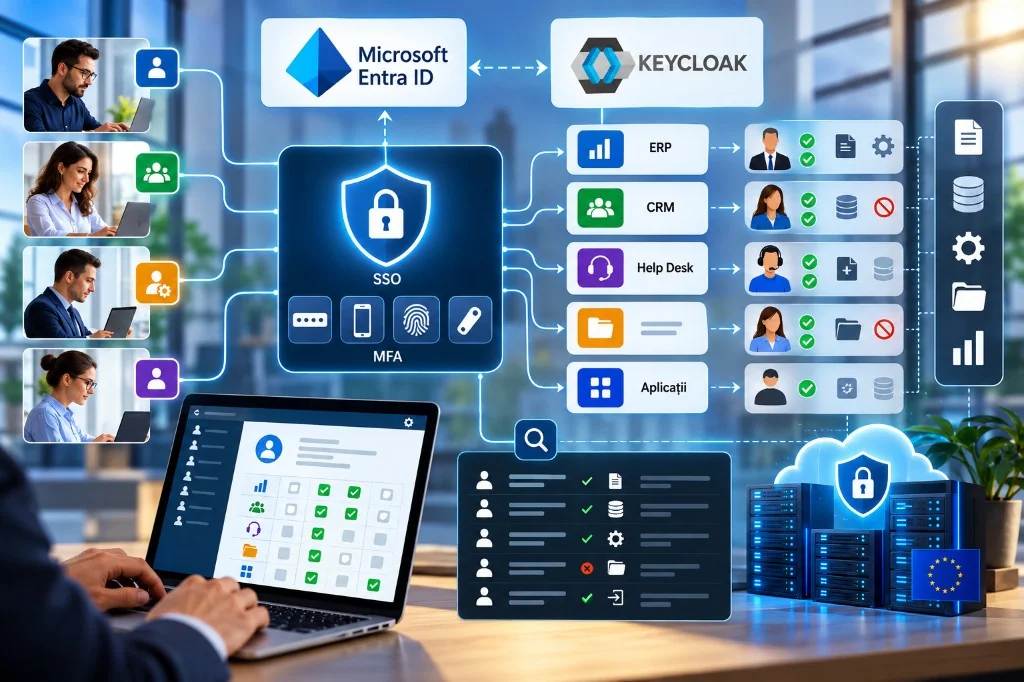
Roles, permissions, audit logs and integration with Microsoft Entra ID or open-source Keycloak.
In a modern company, employees use many IT applications every day: ERP systems, CRM, Help Desk platforms, accounting apps, collaboration tools and document management solutions.
Each of these systems manages information that must not be accessible to every user.
A sales employee may need to view customer data, but not colleagues’ salaries. A Help Desk agent may resolve technical requests, but should not change security configuration for the whole organisation.
Similarly, an IT administrator must be able to manage infrastructure without automatically receiving access to all confidential commercial information.
This separation of duties is one of the fundamental requirements of information security.
It is implemented with technologies such as Single Sign-On (SSO), Multi-Factor Authentication (MFA), Role-Based Access Control (RBAC) and activity audit systems.
Platforms such as Microsoft Entra ID or Keycloak centralise identities and integrate modern authentication mechanisms.
Real security is not limited to checking a password. The essential question is: who has the right to access a given piece of information, under what conditions, and what operations may they perform?
1. Identity, authentication and authorisation: three different concepts
Correct access design in a business application requires understanding the difference between identity, authentication and authorisation.
Digital identity associates a user with an account and with organisation-relevant information: identifier, department, role or group membership.
Authentication is the process by which the system verifies that the user is the person or entity they claim to be. It may use passwords, authenticator apps, security keys or device-integrated biometrics.
Authorisation defines which operations are allowed after authentication. For example, two employees may sign in through the same identity provider, yet one may view invoices while the other may approve them.
This distinction is fundamental. A correctly authenticated person must not automatically receive access to every application function.
There is also a fourth component: audit, which enables tracking of activities and investigation of changes made in the system.
Together, these mechanisms form the basis of an Identity and Access Management (IAM) architecture.
2. What is Single Sign-On and why does it matter?
Single Sign-On (SSO) lets a user authenticate through a central identity provider and access multiple compatible applications without repeatedly entering credentials.
Suppose a company uses a CRM, an ERP system and a Help Desk platform. Without SSO, employees might have three separate accounts, each with its own passwords and recovery procedures.
With SSO, applications can delegate authentication to a central system. The user opens the application, is redirected to the identity provider, signs in, and the application receives the information needed to identify them.
This approach simplifies account administration and can support uniform security policies.
SSO does not mean every application grants the same rights. Each system must decide which resources the authenticated person may use.
Another important aspect is the risk of concentrating authentication in a single point. If the primary identity is compromised, an attacker may try to access multiple services.
That is why SSO must be combined with MFA, monitoring and strict access policies.
3. Protocols used: OpenID Connect and SAML
Integrating business applications with an identity provider relies on standardised protocols.
OpenID Connect (OIDC) is frequently used in modern web and mobile applications. It authenticates users through a mechanism built on OAuth 2.0.
OAuth 2.0 is an authorisation framework for resource access, while OpenID Connect adds a standardised layer for identity authentication.
For modern web applications, Authorization Code Flow is commonly recommended, with PKCE where applicable.
SAML 2.0 is frequently found in enterprise applications, including older systems that use identity federation.
Both protocols integrate with platforms such as Microsoft Entra ID and Keycloak. The choice depends on application architecture, software compatibility and security requirements.
An important principle is that the application must rigorously validate received tokens or identity assertions, including signature, issuer, audience and validity period.
4. MFA: why a password is no longer enough
Multi-Factor Authentication verifies identity with at least two independent factors.
These may include something the user knows, such as a password; something they possess, such as a hardware key; or a biometric characteristic used by an authenticator.
The goal of MFA is to reduce the risk that a stolen password alone allows unauthorised access.
In organisations, MFA should be a priority requirement for administrative accounts, financial applications and systems that process sensitive information.
There are important differences between MFA methods. Temporary codes from TOTP apps provide extra protection compared with passwords alone, but can be intercepted through certain phishing attacks.
Methods based on FIDO2 and WebAuthn, including security keys and properly configured passkeys, offer better phishing resistance.
NIST SP 800-63B-4, published in 2025, emphasises the importance of phishing-resistant authentication.
For companies, an effective strategy may require MFA for relevant accounts and phishing-resistant methods for highly privileged administrators.
5. RBAC: managing access through roles
Role-Based Access Control is one of the most widely used authorisation models in business applications.
Instead of assigning hundreds of individual permissions to each employee, the organisation defines roles that match professional responsibilities.
For example, an application may have Administrator, Manager, Operator and User roles, each with clear rights.
The administrator can manage technical configuration, the manager can view reports, the operator can process requests, and the user can access only their own information.
This approach simplifies administration and reduces the risk of accidentally assigning excessive rights. Roles must still be designed carefully.
If a role grants too many privileges, the system can become vulnerable even when authentication works correctly.
Example permissions matrix
For a Help Desk application, rights might be defined as follows:
| Operation | Administrator | Manager | Operator | Client |
|---|---|---|---|---|
| View own tickets | Yes | Yes | Yes | Yes |
| View department tickets | Yes | Yes | Limited | No |
| Assign tickets | Yes | Yes | Limited | No |
| Delete tickets | Limited | No | No | No |
| View reports | Yes | Yes | Limited | No |
| Change configuration | Yes | No | No | No |
| Manage users | Yes | No | No | No |
The matrix is a conceptual example. In practice each operation must also be checked against organisation, department, information owner and internal rules.
6. From RBAC to ABAC: contextual permissions
RBAC does not solve every situation. In complex applications, access may depend on more conditions than simple role membership.
For example, a Help Desk operator should view only tickets for their department. A regional manager may access customer information in their assigned region, but not elsewhere.
For such cases there is Attribute-Based Access Control (ABAC). ABAC evaluates attributes of the user, the resource and the context.
A rule might allow access only if the user has the Operator role, belongs to the responsible department and the ticket is in the same organisation.
There are also relationship-based models, Relationship-Based Access Control (ReBAC), useful for resources shared among users, teams and organisations.
In practice many business applications use hybrid models: roles for general rights and additional rules for access to specific records. This is safer than creating a very large number of specialised roles.
7. The principle of least privilege
A central principle of information security is Least Privilege: granting only the privileges needed to fulfil responsibilities.
An employee who must view reports does not need the right to modify the database. A developer investigating an error must not automatically receive permanent access to real data for all customers.
Administrative rights should also be separated from accounts used for ordinary work. For sensitive operations, approvals, temporary access and additional authentication can be implemented.
Another important principle is Deny by Default: if an operation is not explicitly allowed, access is refused.
According to OWASP recommendations, authorisation checks must be performed on every relevant request, including at the API level. Hiding a button in the user interface is not a sufficient security measure.
8. Data access control and preventing exposure
One of the most dangerous mistakes in business applications is checking access only to pages, without checking rights over individual records.
For example, a user may have the right to open a ticket page, but not to view every ticket in the system.
If the application only checks for an authenticated session, changing a record identifier could allow access to another client’s data. These problems frequently appear in applications that expose APIs.
To prevent them, checks must run on the server and account for resource owner, organisation, role and context.
In a multi-tenant application, the organisation identifier must be verified for every relevant operation. It is not enough for the interface to send a client identifier. The server must independently determine whether the user may access that organisation.
These controls are essential for SaaS, CRM, ERP and Help Desk applications that manage information for multiple companies.
9. Audit log: who accessed or changed the information?
An effective security system must allow investigation of important activities.
The audit log records relevant events about authentication, authorisation and operations executed in the application.
A well-designed audit event may include user identifier, date and time, action, affected resource, organisation, outcome and a correlation identifier.
For example, the log may show that a manager changed an employee’s access level, or that a user tried to view a resource they were not permitted to see.
In some applications it may be justified to record access to sensitive documents, not only changes.
It is important to distinguish the identity provider’s log from the application’s log. Microsoft Entra ID or Keycloak can record authentication and identity-administration events, but they do not automatically know every commercial operation performed in ERP or CRM.
The application must generate its own audit events for important actions. Logs must be protected against unauthorised modification, monitored and retained under documented policies.
Passwords, session tokens or other secrets should not be stored in the audit log.
10. Microsoft Entra ID: identity and access for the enterprise
Microsoft Entra ID, formerly Azure Active Directory, is Microsoft’s platform for managing identities and access to applications and resources.
It is frequently used in organisations that use Microsoft 365, Azure and enterprise applications.
Entra ID enables centralised authentication, Single Sign-On, user and group administration, and application integration through OpenID Connect and SAML.
An important capability is Conditional Access. It applies policies that consider user, application, device and other relevant signals. For example, access to a financial application may require multi-factor authentication or a device that complies with organisational policies.
For internally developed applications, Microsoft Entra allows defining App Roles that can be assigned to users or groups and transmitted to the application in tokens. The application must interpret these roles and perform its own authorisation checks.
The platform also provides authentication, audit and identity-provisioning logs, depending on available features.
Licensing must be considered: Conditional Access generally requires Microsoft Entra ID P1 or a licence that includes the feature. Advanced risk-based policies may require P2.
Entra ID is a practical choice for organisations already integrated into the Microsoft ecosystem.
11. Keycloak: the open-source alternative for identity and SSO
Keycloak is an open-source Identity and Access Management platform that can be installed on your own infrastructure.
The system offers Single Sign-On, OpenID Connect and SAML integration, user, group and role administration, and multi-factor authentication mechanisms.
Keycloak can integrate with external identity providers and with LDAP or Active Directory directories, depending on the implementation architecture.
An important advantage is the ability to customise authentication flows. The organisation can control the sign-in interface, access rules, sessions and certain authorisation policies.
Keycloak includes features for recording user and administrator events, which must be enabled and configured appropriately for audit requirements.
For organisations interested in European digital sovereignty, installing Keycloak on a server administered in the European Union can be an attractive option.
Open source does not mean administration without cost. Updates, backups, monitoring, protection of cryptographic keys and recovery procedures after incidents are required.
In production environments, availability and security of the identity service must be ensured, because its unavailability can affect access to all connected applications.
12. Microsoft Entra ID versus Keycloak
The two platforms address similar needs but have different operational models.
| Criterion | Microsoft Entra ID | Keycloak |
|---|---|---|
| Model | Managed identity service | Open source, self-hostable |
| SSO | Yes | Yes |
| OIDC and SAML | Yes | Yes |
| MFA | Yes | Yes |
| Roles and groups | Yes | Yes |
| Advanced policies | Conditional Access | Configurable flows and policies |
| Infrastructure | Managed by the provider | Managed by the organisation or a contractor |
| Costs | Depends on licences | Free software, paid administration |
| Customisation | Within platform limits | High extensibility |
| Hosting control | Depends on service and contract | Choice of own infrastructure |
Microsoft Entra ID can reduce operational effort for organisations that already use Microsoft services.
Keycloak offers greater flexibility and infrastructure control, but requires technical administration skills.
The two solutions are not mutually exclusive. Keycloak can also act as an identity broker for authenticating users through Microsoft Entra ID.
This approach can be useful when an organisation wants to keep Microsoft identity integration while standardising sign-in for multiple in-house applications through Keycloak.
13. Practical example: access in a Help Desk system
Consider a company that provides IT services for multiple clients. The firm uses a Help Desk platform connected to Microsoft Entra ID or Keycloak.
Employees sign in with SSO, and highly privileged accounts require MFA.
The application defines roles such as Operator, Manager and Administrator. An operator may view only tickets for organisations they are responsible for. The manager may view department reports and redistribute requests.
The administrator may manage technical configuration, while access to confidential information may remain subject to separate permissions.
Clients sign in to their own portal and may view only the requests they are entitled to see.
When an employee tries to access a ticket, the application checks identity, role, organisation and the user’s relationship to the requested resource. If the operation is not allowed, the server refuses access.
Relevant events are recorded in the audit log so the security team can investigate incidents.
This architecture separates centralised authentication from commercial access rules.
14. The identity lifecycle
Access security does not end when an account is created. Organisations must manage the full identity lifecycle.
On joining, the user receives the access needed for their role. When changing department, rights must be updated and privileges that are no longer needed removed. When collaboration ends, accounts and sessions must be deactivated according to internal procedures.
This approach is known as Joiner–Mover–Leaver.
In large companies, processes can be automated by integrating IAM systems with human resources applications.
An important element is periodic verification of existing rights, known as access review. Through these reviews, managers and security owners confirm whether users still need the privileges assigned to them.
Technical accounts, API-connected applications and identities used by automations must also be analysed.
15. Digital sovereignty, GDPR and access control
In the context of European digital sovereignty, identity administration is an important component of control over IT infrastructure.
GDPR requires appropriate technical and organisational measures to protect personal data, taking processing risks into account. Access control, strong authentication and logging can contribute to meeting these obligations.
Implementing Microsoft Entra ID or Keycloak does not automatically guarantee GDPR compliance. The organisation must define access policies, data retention periods, incident response procedures and documented responsibilities.
Keycloak can allow hosting identities on European infrastructure, but external dependencies must also be evaluated. Microsoft Entra ID can be used in an architecture that meets applicable requirements if configuration, contracts and data flows are analysed.
The choice must rest on risk analysis, not solely on the provider’s name or origin.
16. Recommendations for implementing access security
An identity management project should start by inventorying applications, users and sensitive information.
The organisation can then define a unified authentication policy and a rights matrix for each application.
- SSO integration should be gradual, starting with systems that support standard protocols.
- MFA should be enabled for relevant accounts, with priority for administrators and users who access sensitive information.
- Development teams must implement authorisation checks for every important operation.
- Special attention is needed for multi-tenant applications, where separation of information between organisations is essential.
- Before launch, test cases where users try to access information belonging to other departments or organisations.
- Prepare procedures for access revocation, identity-provider unavailability and recovery of administrative accounts.
Audit, monitoring and periodic privilege review must be treated as continuous processes.
Conclusion: security is not just signing in
As organisations adopt more business applications, managing identities and access becomes a strategic issue.
Single Sign-On simplifies authentication and centralises policies. Multi-Factor Authentication reduces account compromise risk, and RBAC and ABAC models define which information and operations users may access.
Audit logs provide visibility into important activities and support incident investigation.
Microsoft Entra ID and Keycloak are two relevant options for building this infrastructure. The first offers strong integration in a managed enterprise ecosystem; the second allows deploying an open-source identity service on infrastructure chosen by the organisation.
Regardless of platform, security depends on correct role design, ongoing permission checks and responsible identity administration.
The question at the heart of every business application is not only “Who can sign in?”, but above all “Who is allowed to see what, change what, and under what conditions?”. The answer defines the true maturity of digital security in an organisation.
Sources and technical documentation
- Microsoft Entra ID – official documentation
- Microsoft Entra – Single Sign-On
- Microsoft Entra – Application Roles
- Microsoft Entra – Conditional Access
- Keycloak – official documentation
- Keycloak – Server Administration Guide
- OWASP – Authorization Cheat Sheet
- NIST SP 800-63B-4 – Authentication Guidelines
Technical informational article, updated for October 2026. Available features and licensing conditions must be verified before implementation.
Keep reading
- European digital sovereignty: why Help Desk and Support Service applications must become part of Europe’s technological independence
- Help Desk and Support Service applications: paid solutions and open-source platforms on your own server
- Why do my emails go to spam? Complete guide to SPF, DKIM, DMARC and server reputation
- How to build your own company email server with Mailcow, without monthly per-user subscriptions
Need guidance on a similar project or a technical audit?