INITWIN · Editorial
Software & digital strategy
Software for schools and universities: electronic grade book, teacher attendance and automated inspectorate reports
Guide for head teachers and school offices: less bureaucracy, digital grade book, attendance, reports and parent communication
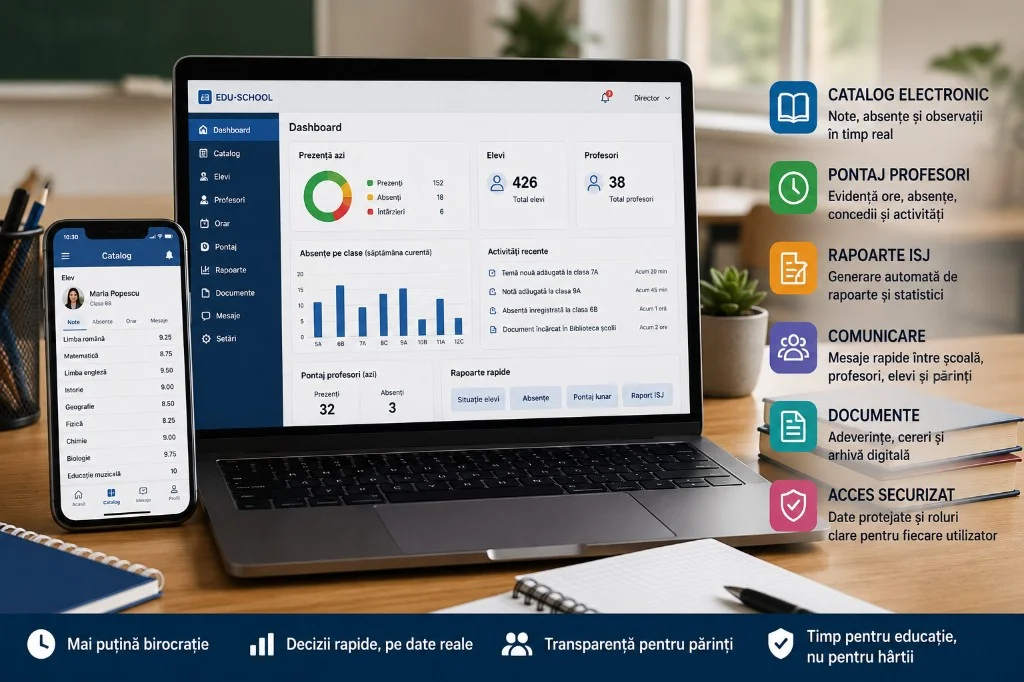
An accessible guide for head teachers, school offices and educational institutions that want less bureaucracy and more control.
School and university digitalisation should not mean more computer work. It should mean less repetitive work, less paper, fewer situations rebuilt manually and more time for education.
In reality, many educational institutions still work with a tiring mix of registers, Excel files, Word documents, emails, official applications, internal platforms, WhatsApp groups and files sent between teachers, the school office and management. Every urgent report means someone has to search for data, check tables, complete situations and send documents to management, the inspectorate or other institutions.
For a head teacher, the problem is visibility. They want to quickly know the situation of students, absences, teachers, classes, activities, documents and reporting. For the school office, the problem is workload. The same data is entered multiple times, in multiple formats. For teachers, the problem is time. Too many administrative activities reduce time available for lesson preparation and working with students. For parents and students, the problem is communication: they want clear, fast and correct information.
Well-built educational software can reduce these problems. It does not solve them by magic, but it can organise school flows into a coherent system: electronic grade book, teacher attendance tracking, documents, certificates, reports, notifications, digital archive and dashboards for management.
Why digitalisation in education is different from other sectors
A school does not work like an online store or a transport company. It has its own rules, calendars, specific reporting, different roles and many user categories: students, parents, teachers, homeroom teachers, school office, accounting, head teachers, inspectors, auxiliary staff and administrators.
Educational software must respect this reality. It is not enough to have an online form or a digital table. The system must understand classes, school years, study programmes, subjects, teachers, timetables, absences, grades, school situations, documents, attendance, leave, reports and access rules.
In a school, the same information may be needed in multiple places. For example, a student appears in the grade book, in situations for the school office, in statistical reports, in documents for parents and in the archive. If data is entered manually in each place, errors appear. If centralised correctly, work decreases.
Good digitalisation does not mean replacing paper with screens. It means building a logical workflow.
Electronic grade book: more than grades and absences
The electronic grade book is the most visible component for teachers, students and parents. It allows entering grades, assessments, absences and observations in a digital system.
But its real value is not just that the teacher no longer writes in a physical register. Value appears when data becomes useful.
A good electronic grade book can help with:
- tracking absences in real time;
- informing parents;
- generating class situations;
- calculating averages;
- identifying at-risk students;
- reports for homeroom teachers and management;
- archiving at year end;
- exports for official situations;
- reducing transcription errors.
For the head teacher, the electronic grade book offers a faster picture of the school. For the school office, it can reduce repetitive requests. For parents, the benefit is communication: they can receive notifications and see the situation on the platform.
Electronic grade book pitfalls
The electronic grade book must be implemented carefully. Otherwise, it can become just another application.
- Duplicated work — teachers enter in the grade book, but the school office copies manually into another system.
- Lack of training — a cumbersome application is perceived as a burden.
- Lack of procedures — who changes a grade, who approves corrections, how situations are closed.
- Lack of archiving — documents and situations must be kept according to rules.
- Security — student data is personal data; not every user sees everything.
Teacher attendance: from signed sheets to digital records
Teacher and school staff attendance is an important administrative area, but often time-consuming. In many institutions, attendance is still done through sheets, tables or manually completed documents.
A digital attendance module can include:
- teacher timetables;
- hours worked and supplementary hours;
- justified absences, leave, permissions;
- extracurricular activities, homeroom hours, administrative activities;
- monthly reports;
- exports for payroll or internal verification.
For the school office, the benefit is reduced manual centralisation. For the head teacher, the benefit is control. For teachers, the benefit is clarity: each can see their situation, without lost sheets or tables by email.
Digital attendance must not be complicated. If the system requires too many steps, it will be rejected. It must be simple, clear and adapted to how the school actually works.
School inspectorate reports: automating repetitive situations
Reports to the inspectorate are one of the biggest sources of pressure for schools. Sometimes situations are requested quickly, in different formats, with data about students, classes, staff, absences, results or activities.
The problem is that the data already exists in the school, but is spread across multiple places. Well-built educational software can help generate reports by centralising data.
Examples of useful reports:
- situations by class and student count per level;
- absences by period;
- statistics by subject;
- reports for homeroom teachers;
- situations regarding staff and teacher presence;
- monthly summaries;
- Excel/PDF exports;
- custom reports for management.
Automation does not mean automatic sending to authorities without verification. The system generates the report, the responsible person checks it, then transmits it according to procedure. The school gains time but keeps control.
Digital school office: the area with the biggest impact
In many schools, the school office is the administrative centre. Educational software must not be designed only for teachers. It must help the school office significantly.
Useful modules for the school office:
- digital document register;
- certificate generation;
- student archive and class history;
- parent documents, online requests, transfers;
- school situations, exports, internal notifications;
- deadline tracking and quick search.
A simple example: generating a certificate. Instead of the secretary searching for student data and manually completing a Word template, the system can generate the document automatically from existing data. The secretary only checks and prints or sends the document.
Communication with parents and students
Currently, many schools use WhatsApp groups, emails, notices, phones and messages through homeroom teachers. These channels are useful but can become chaotic.
An educational platform can centralise communication: absence notifications, announcements from management, messages for classes, available documents, meeting appointments, important alerts and teacher–parent communication.
For universities, communication can include notifications about exams, fees, documents, timetables, requests and administrative statuses.
It is important that the platform does not become noisy. If too many notifications are sent, people will ignore them. Messages must be clear, relevant and well organised.
Universities: similar needs, but more complex flows
Universities have different processes than schools, but administrative problems are similar: lots of data, lots of documents, requests, reports, busy school offices.
University software can include: digital student file, academic situation, grades and credits, online requests, certificates, fees, study contracts, timetable, exam scheduling, communication with the school office, faculty reports, management dashboards and document archiving.
For universities, integration with existing systems is very important. Many already have internal platforms, but these can be old, hard to use or disconnected from other tools. A custom solution can cover exactly the missing areas: student portal, document automation, dashboards, integrations and reports.
Personal data and security
Schools and universities work with a lot of personal data. Security is not optional.
Educational software must have:
- secure authentication and roles with permissions;
- separate access for teachers, parents, students, school office and management;
- activity log, backup, encryption, password policies;
- export protection and document control;
- logs for important changes;
- procedures for inactive accounts.
A parent must see only their child's data. A teacher must see relevant classes and subjects. The school office needs administrative access, but controlled. The head teacher needs reports, but not necessarily unnecessary exposure of all sensitive data.
Integration with official systems: cautious promises
Education has official platforms and procedures. Therefore, any software company must be cautious when promising integrations.
It is not correct to say "it integrates with any official system" without analysis. Sometimes there are APIs, sometimes exports, sometimes only standardised files, and sometimes procedures change.
A serious approach is to build the application so it can export data in useful formats, reduce duplicated work and prepare information for reporting. Direct integration can be analysed separately, in stages, depending on current requirements.
What do you automate first?
A school must not digitalise everything at once. Too large an implementation can scare the team and create resistance.
A realistic order can be:
- electronic grade book and school situations;
- reports for management;
- documents and certificates;
- teacher attendance;
- communication with parents;
- school inspectorate reports;
- digital archive;
- advanced dashboards.
For some schools, the first step may be the grade book. For others, the digital school office. For a university, it may be the student portal or request automation. What matters is starting with the area that consumes the most time and produces the most errors.
Realistic implementation in a school
A healthy project starts with a simple analysis: discussions with the head teacher, school office, a few teachers, possibly accounting and the IT responsible. Identify what is completed manually, which reports consume time, where delays appear.
The first version does not need to be perfect. It must solve a clear problem — for example users and roles, students and classes, electronic grade book, basic reports, simple documents, internal notifications.
After testing, add attendance, inspectorate reports, archive, parent communication and other modules. Training is very important. A good application can fail if people do not understand how it helps them.
Indicative costs
Cost depends on complexity, number of users, modules, integration, security, support and customisation.
- Simple solution (small institution, basic modules): from a few thousand euros.
- Custom school platform (grade book, school office, attendance, reports, roles): €10,000–30,000 or more.
- Complex university / educational group platform: €40,000–80,000 or more.
Beyond development: hosting, maintenance, support, backup, updates and training. For institutions that do not want full custom software, standard solutions or subscriptions may exist — the decision depends on budget, procedures and required customisation level.
Concrete benefits
- less manual work and fewer errors;
- reports generated quickly;
- more efficient school office, better informed management;
- better communication with parents;
- clearer attendance, documents easier to find;
- digital archiving, centralised data, better decisions;
- time saved for teachers and administrative staff.
The biggest benefit is not technology itself. It is time regained — for the school office, head teacher, teachers and parents who no longer need to call for every piece of information.
Frequent mistakes
- choosing software only by price, without checking the institution's flows;
- not involving the school office in analysis;
- not providing training;
- creating double operation (digital + manual in parallel);
- ignoring data protection;
- not establishing rules for changes, access and archiving;
- trying to digitalise everything at once;
- no support after launch.
Conclusion
Schools and universities need software not because "it is modern", but because administrative volume has become too large for manual methods.
The electronic grade book, teacher attendance, school inspectorate reports, digital documents, parent communication and management dashboards can transform how an educational institution works.
A good platform does not need to be complicated. It must be clear, secure and adapted to the people who use it daily: head teachers, secretaries, teachers, parents, students and pupils.
Successful digitalisation does not mean more applications. It means less duplicated work, more accurate data, faster reports and better decisions. For a school or university, the right software is administrative infrastructure that can free time for what truly matters: education.
Keep reading
- Why do my emails go to spam? Complete guide to SPF, DKIM, DMARC and server reputation
- How to build your own company email server with Mailcow, without monthly per-user subscriptions
- How to prepare your team for new software: training, adoption and resistance to change
- The 8-week MVP: how to launch a product idea without burning the budget
Need guidance on a similar project or a technical audit?