INITWIN · Editorial
Software & digital strategy
Software for dental practices: online booking, digital patient records and automatic reminders
Fewer missed appointments, efficient reception, treatment plans and reports for dental clinics
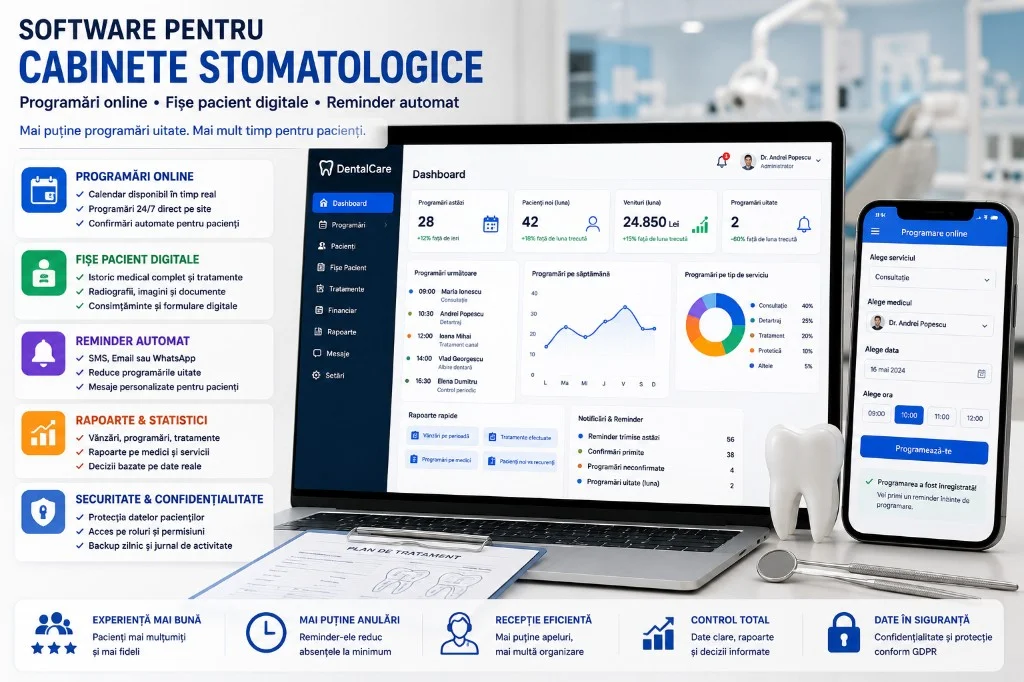
How dental clinics can reduce missed appointments, organise patient records and work more efficiently.
A dental practice does not lose money only when it has no patients. It also loses money when patients forget appointments, when reception spends too long on the phone, when medical records are hard to find, when treatments are not tracked clearly, or when the dentist cannot quickly access the patient’s full history.
In dentistry, organisation matters enormously. Every patient has appointments, treatments, X-rays, treatment plans, consents, recommendations, payments, periodic check-ups and communications. If all this lives in paper diaries, printed files, Excel spreadsheets and WhatsApp messages, the practice runs on heavy manual work and error risk.
Dental practice software does not replace the dentist. By freeing staff from repetitive tasks, it gives more time for patients: online booking, digital records, automatic reminders, treatment history, documents and reports.
Why missed appointments are a real problem
A missed appointment means lost time for dentist, assistant and reception, an empty slot and lost revenue. For complex procedures — endodontics, surgery, long treatments — the impact can affect the whole day.
Many patients do not skip intentionally. They forget, mix up the time or do not confirm. A message sent 24 or 48 hours ahead can significantly reduce no-shows. The patient can say if they cannot come, and reception can fill the slot.
Online booking: fewer phone calls, more control
Reception is often overloaded. Online booking reduces pressure: the patient chooses the service, dentist, date and available slot.
The practice controls which services are online (consultation, scaling, check-up), how long each takes and which slots are blocked. Complex procedures can stay phone-only.
- real-time calendar;
- automatic confirmation and reminder;
- cancellation or rescheduling;
- reception notification;
- sync with internal schedule.
The practice calendar: heart of daily operations
The calendar should show dentists, rooms, slots, confirmed appointments, new patients, delays and blocks.
Useful features: day, week or dentist view; colours by treatment type; status (new, confirmed, arrived, completed, cancelled, no-show); duration per service; leave blocking; special schedule per dentist.
For multi-chair clinics, the calendar prevents overlaps and uses chairs better.
The digital patient record
The digital record can include: identification and contact details; medical history; allergies; treatments; plans; diagnoses; X-rays; documents; consents; payments; past and future appointments; post-treatment recommendations.
The dentist opens the record and sees relevant history — without physical folders. For multi-dentist clinics, continuity and correct permissions are essential.
Treatment plan: more clarity for the patient
A digital plan with clear stages — consultation, investigations, hygiene, cavity treatment, endodontics, prosthetics, implant, check-up, maintenance — can include estimated cost, duration, notes and status.
The patient can receive the plan by email or in a secure portal. Clarity builds trust and reduces misunderstandings.
Automatic reminders: SMS, email or WhatsApp?
Reminders are probably the fastest automation with direct impact:
- confirmation after booking;
- 48h and 24h reminders;
- post-treatment message and instructions;
- periodic check-up or 6-month hygiene reminder;
- rescheduling or unaccepted plan.
Channels: email, SMS, push (if there is an app). Messages must be clear and without unnecessary sensitive medical detail — e.g. “We remind you of your appointment tomorrow at 10:00.”
Reception: less repetitive work
A well-implemented system reduces: calls for confirmations; searching for records; manual data entry; disorganised rescheduling; manual reminders.
Reception sees on one screen: today’s appointments; confirmed/unconfirmed; new patients; cancellations; messages sent; outstanding payments; missing documents.
Reports for the clinic manager
A dashboard can show: appointments; new and returning patients; cancellations and no-shows; occupancy per dentist; revenue per service and dentist; accepted plans; outstanding payments; patient sources.
Decisions move from “I think…” to real data: which services are in demand, where appointments are lost, which patients should be recalled.
Stock and dental materials
Simple module: material tracking; minimum stock; alerts; suppliers; expiry dates; consumption per treatment. For larger clinics, it reduces waste and shortages on busy days.
Documents, consents and forms
Document templates; auto-fill; tablet signature (if the flow is correct); digital archiving; attachment to patient record; PDF export; quick search.
Define clearly who completes, who verifies, where it is stored and how long it is kept.
Medical data and confidentiality
GDPR and medical data require: secure authentication; roles (dentist, assistant, reception, admin); activity log; backup; encryption; limiting data in notifications.
Reception does not necessarily see all clinical details. The administrator sees reports, not necessarily sensitive details. Each role sees only what they need.
Integration with the practice website
A site with services, dentists, booking form, calendar, educational blog and quick booking button turns SEO traffic into real appointments.
Patient portal: useful, but not mandatory in phase one
The portal can offer bookings, documents, treatment plan, invoices, recommendations. For small practices it can be a later phase — with authentication and very secure access.
Realistic implementation costs
- Small practice — standard subscription (booking, SMS, simple records).
- Mid-size clinic — €5,000–15,000 (records, plans, documents, reports, website).
- Large clinic / chain — €20,000–50,000+ (multi-location, portal, advanced reports).
Plus: hosting, maintenance, SMS, email, backup, security. Phased approach, not everything on day one.
What to implement first?
- digital calendar;
- online booking;
- SMS/email reminders;
- digital patient record;
- documents and consents;
- treatment plans;
- management reports;
- stock and patient portal.
Start with the most painful problem — reminders if no-shows are high, digital file if records are chaotic.
Common mistakes
- choosing software by price alone;
- no training for reception and dentists;
- too many or aggressive reminders;
- sensitive medical data in SMS;
- no backup and overly broad access to records;
- outdated dentist schedules;
- full digitalisation on day one without phasing.
Concrete benefits
- fewer missed appointments;
- efficient reception, organised calendar;
- easy-to-find records, centralised history;
- clear plans, better communication;
- reports for the manager, professional image;
- better patient experience.
Conclusion
Dental practices need software for concrete problems: missed appointments, hard-to-find records, busy reception, scattered documents.
Online booking helps patients book more easily. Reminders reduce no-shows. Digital records give fast access to history. Reports help the manager run the clinic better.
Digitalisation can start simple: calendar, booking, reminders and patient records. Good technology does not replace the patient relationship — it supports it. In a clinic where every appointment counts, a timely reminder can be one of the simplest investments with immediate impact.
Keep reading
- Why do my emails go to spam? Complete guide to SPF, DKIM, DMARC and server reputation
- How to build your own company email server with Mailcow, without monthly per-user subscriptions
- How to prepare your team for new software: training, adoption and resistance to change
- The 8-week MVP: how to launch a product idea without burning the budget
Need guidance on a similar project or a technical audit?