INITWIN · Editorial
Software & digital strategy
How to integrate an ERP with your online store: data flow, real-time stock and automatic invoicing
A practical guide for retailers and distributors who want to eliminate duplicate manual work
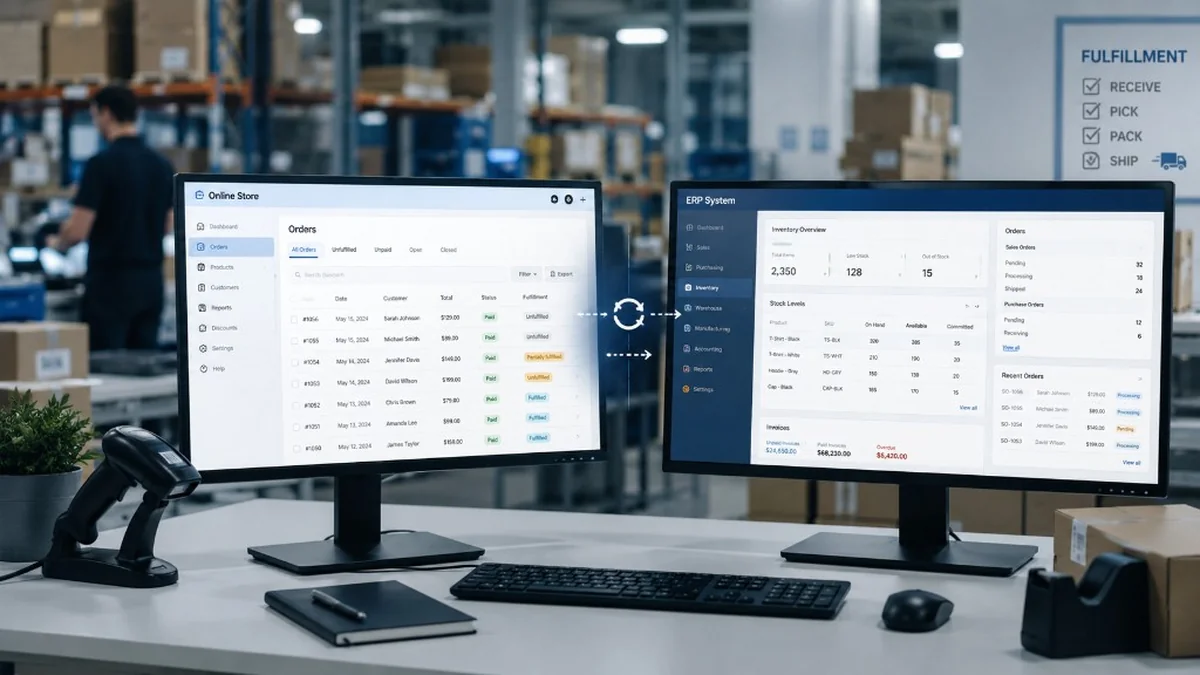
A practical guide for retailers and distributors who want to eliminate duplicate manual work.
For many retailers and distributors, the online store has become an important sales channel. Clients order directly from the website, payments are processed online, couriers pick up parcels and the sales team tracks orders daily. In parallel, the company uses an ERP for management, stock, invoices, clients, suppliers, receipts, delivery notes, prices and reports.
The problem appears when the online store and the ERP do not communicate with each other.
Orders come in on the website but must be entered manually into the ERP. Stock is updated in management but the website shows old values. Invoices are issued separately. Products are modified in the ERP but descriptions or prices must be updated again in the e-commerce platform. The courier receives data from another system. Accounting gets information late. The manager sees incomplete reports.
This is duplicate manual work: the same information is entered, checked and corrected in multiple systems.
ERP integration with the online store solves exactly this problem. It creates an automatic data flow between the company's internal system and the e-commerce platform. The result is less repetitive work, fewer errors, more accurate stock, faster invoicing and a better client experience.
What does ERP integration with an online store mean?
ERP–e-commerce integration means connecting the two systems so that important data flows automatically between them.
Normally, the ERP is the main source for management, stock, prices, invoicing, clients and accounting. The online store is the channel through which the client sees products, places orders and tracks their status.
A good integration clearly establishes which system is the source of truth for each type of information.
For example:
- the ERP can be the main source for stock, SKU codes, prices, VAT rates and invoices;
- the online store can be the main source for client orders, delivery data and buying behaviour;
- the courier system can be the main source for AWB tracking numbers and delivery status.
Integration connects these sources into a coherent flow. You no longer work with isolated data, but with an ecosystem.
Why retailers and distributors need integration
At the beginning, an online store can be managed manually. If you have 5–10 orders per day, someone can copy orders into the ERP, update stock and issue invoices. The process is imperfect but manageable.
The problem appears when volume grows.
At 50, 100 or 500 orders per day, manual entry becomes costly and risky. Address errors appear, wrong products, negative stock, delayed invoices, duplicate orders, unhappy clients and much time lost on repetitive operations.
For distributors, the situation is even more complicated. They may have thousands of products, different price lists, stock in multiple warehouses, B2B clients with personalised discounts, recurring orders, sales agents and complex deliveries.
Without integration, each system tells a different story. The website shows one stock level, the ERP shows another, the agent promises the client one deadline, the warehouse has a different reality and accounting finds out last.
Integration brings order to this flow.
The ideal flow: from product to order, invoice and delivery
A well-designed ERP–online store flow can look like this:
- Products are managed in the ERP.
- Stock is updated automatically in the online store.
- Prices are synchronised according to commercial rules.
- The client places the order on the website.
- The order is transmitted automatically to the ERP.
- The ERP reserves or deducts stock.
- The invoice is issued automatically or prepared for validation.
- Delivery data is sent to the courier.
- The AWB is generated and saved in the order.
- The client receives automatic notifications.
- Delivery status is updated in the online store.
- The manager sees consolidated reports.
This flow reduces manual intervention. The team no longer moves data from one system to another, but checks exceptions: problematic orders, out of stock, incomplete data, failed payments, returns or discrepancies.
Product synchronisation
The first important area is product synchronisation.
Products can have a lot of information: SKU code, name, description, category, price, VAT, unit of measure, images, weight, dimensions, brand, attributes, variants, barcodes and active/inactive status.
The important question is: where is this data managed?
In many companies, the ERP manages codes, stock, prices and basic commercial information. The online store manages commercial descriptions, images, SEO and product presentation.
Integration must respect this reality. Not all fields need to be synchronised in both directions. Sometimes the ERP sends only the code, price and stock, and the marketing team completes the description in the e-commerce platform.
For distributors, product synchronisation is critical. If there are thousands or tens of thousands of products, manual updating is impossible. Integration can automatically import new products, deactivate unavailable products and update prices.
The trap is lack of standardisation. If SKU codes in the ERP are not clean, if the same product appears twice or if units of measure are inconsistent, integration will pass the chaos on. Before automation, data must be cleaned.
Real-time stock or periodically updated stock?
One of the most important questions is how often stock must be synchronised.
Many clients say they want "real-time stock". But in practice, what real-time means for the business must be defined.
For some stores, updating every 15 minutes or once an hour is enough. For others, especially if they sell few, expensive products or products with limited stock, synchronisation must be almost instant.
There are several approaches:
- periodic synchronisation through scheduled jobs;
- event-based synchronisation when the ERP modifies stock;
- synchronisation when an order is placed;
- real-time stock check before order confirmation;
- stock reservation in the ERP after order.
For retailers with high volume, a combined solution works well. The website displays periodically updated stock, but before final confirmation it checks real availability. This reduces the risk of overselling.
For companies with multiple warehouses, integration becomes more complex. Stock is not just a total figure. You need to know which warehouse the product is in, which warehouse serves the order, which products are reserved, which are in transit and which stock is actually available for sale.
Prices, discounts and commercial lists
Prices are another sensitive area.
A B2C store may have simple prices: standard price, reduced price, promotional campaigns. A B2B distributor may have much more complex rules: prices per client, category discounts, special contracts, volume prices, temporary promotions, prices by warehouse or currency.
ERP–e-commerce integration must know where prices come from and how rules are applied.
For B2C, the online store can manage marketing campaigns and the ERP can keep the base price.
For B2B, the ERP is often the main source for price lists and discounts. In this case, the authenticated client on the website must see their price, not a generic price.
This is one of the areas where custom integrations become very valuable. Standard plugins can synchronise simple prices, but cannot always cover a company's specific commercial rules.
Orders: from online store directly to ERP
The order is the central point of integration.
When a client places an order on the website, data must be sent to the ERP: client, products, quantities, prices, discounts, VAT, delivery address, billing address, payment method, delivery method, notes and payment status.
If this transfer is done manually, many risks appear. An address can be copied incorrectly. A product can be entered with the wrong code. The discount may be missing. The order can be forgotten. The invoice can be issued late.
Through integration, the order reaches the ERP automatically. There it can be validated, reserved in stock, prepared for invoicing and sent to the warehouse.
For retailers, this automation shortens processing time.
For distributors, it can eliminate entire hours of administrative work daily.
However, the flow must be thought through carefully. What happens if the ERP does not respond? What if a product does not exist in the ERP? What if stock is no longer available? What if payment is pending?
A good integration does not assume everything works perfectly. It also handles exceptions.
Automatic invoicing and RO e-Factura
Invoicing is one of the most important areas for companies in Romania. An online order must reach a correct fiscal flow: invoice, client data, VAT, series, number, credit notes, returns, collections and, where applicable, transmission to applicable fiscal systems.
Integration with the ERP can automate invoice issuance. After the order is validated and payment is confirmed, the ERP can generate the invoice automatically. The invoice can be sent to the client by email, made available in the client account and prepared for required reporting.
For B2B and companies that issue many invoices, integration with the e-Factura area becomes an important part of the architecture. Generating a PDF is not enough. There must be a correct flow for fiscal data, validations, statuses, errors and archiving.
A frequent trap is automating invoicing without exception rules. What happens if the client's fiscal data is incomplete? If the tax ID is wrong? If the billing address is missing? If payment fails? If there is a partial return? If the invoice must be reversed?
These scenarios must be discussed before implementation.
Courier integration
For retailers, ERP–online store integration does not stop at invoicing. The next step is delivery.
An efficient flow can automatically send order data to the courier: name, address, phone, weight, cash on delivery, additional services and notes. The courier returns the AWB and it is saved in the order and sent to the client.
If there are multiple couriers, the system can choose the courier based on rules: weight, locality, cost, product type, warehouse or client preference.
Delivery status can be synchronised back to the online store. The client sees that the parcel has been picked up, is in transit or has been delivered.
This automation reduces support calls and offers the client a better experience.
Returns and credit notes
Returns are often ignored in the first stage of integration, but they are very important.
A return affects stock, invoice, payment, client, courier and reporting. If returns are managed manually, discrepancies between ERP and online store quickly appear.
A good return flow should establish:
- where the return is initiated;
- how it is approved;
- how stock is updated;
- how the credit note is issued;
- how money is refunded;
- how the client is notified;
- how reporting is updated.
For retailers with high volume, automating returns can save a lot of time and reduce errors.
B2B: when integration becomes more complex
For B2B distributors, ERP–e-commerce integration is more than product and order synchronisation.
A B2B portal can have:
- personalised prices per client;
- credit limits;
- payment terms;
- recurring orders;
- invoice history;
- balances;
- negotiated discounts;
- products available only to certain clients;
- stock by warehouse;
- associated sales agents;
- internal approvals;
- quick orders by SKU code;
- order import from Excel.
In these cases, custom integration is almost inevitable. Standard plugins cover only part of the flow. Real value comes from adapting to how the company sells.
For a distributor, a B2B portal integrated with the ERP can become a competitive advantage. Clients can order faster, see their prices, download invoices and track order status without calling an agent.
API, files or middleware?
Integration can be done in several ways.
The most modern approach is through API. The online store and ERP communicate directly through endpoints. Data is sent and received in a structured way and systems can react quickly to events.
Sometimes the ERP does not have a good API or does not allow direct connection. In these cases, intermediate files can be used: CSV, XML, Excel or other formats exported and imported periodically.
For more complex projects, middleware can be used: an intermediate application that connects the ERP, online store, couriers, payment system and other services. Middleware handles data transformation, logs, errors, retries and monitoring.
For serious retailers, middleware can be the best solution. It does not load the online store directly with all ERP logic and offers a central control point.
Monitoring and logs
An integration without logs is hard to maintain.
If an order does not reach the ERP, the team must know why. If stock does not update, the cause must be identified. If the invoice is not generated, there must be a clear error message.
A good integration system should include:
- synchronisation history;
- status for each order;
- detailed errors;
- automatic retry;
- team alerts;
- integration health dashboard;
- report of failed synchronisations;
- ability to manually relaunch a synchronisation.
These elements make the difference between a fragile integration and an operational one.
Stages of an ERP–online store integration project
A healthy project starts with analysis.
First stage is inventory of systems. What ERP do you use? What e-commerce platform? What couriers? What payment processor? What invoicing system? What flows exist now?
Second stage is data mapping. What fields exist in the ERP? What fields exist in the online store? How do products, clients, orders, stock and invoices match?
Third stage is defining flows. What is synchronised? In which direction? How often? What happens on error?
Fourth stage is integration development. Here APIs, scripts, middleware or necessary connectors are built.
Fifth stage is testing. Normal orders, orders with discounts, out-of-stock products, returns, payment errors, invoicing, couriers and exceptions are tested.
Sixth stage is controlled launch. Ideally, you start with a limited set of products or orders, then expand.
Seventh stage is monitoring and support.
How much does an ERP–e-commerce integration cost?
Cost depends on complexity.
A simple integration, with order and stock synchronisation between an online store and an ERP with a clear API, can start from a few thousand euros.
A medium integration, with products, stock, orders, invoices, couriers and errors handled correctly, can reach €8,000–20,000.
A complex integration for B2B distributors, with personalised prices, multiple warehouses, client portal, e-Factura, couriers, returns, middleware and monitoring dashboard, can exceed €25,000–50,000.
Maintenance is added to the initial cost. ERPs are updated, e-commerce platforms change APIs, couriers modify endpoints and fiscal rules can change. A critical integration needs support.
Common mistakes
- Starting development directly without data mapping.
- Assuming stock is a simple number. In reality, there may be reserved, available, blocked, in-transit stock or stock across multiple warehouses.
- Not handling errors. Any integration must know what to do when a system does not respond.
- Synchronising everything in both directions without clear rules. This can create conflicts.
- Ignoring returns.
- Not having logs.
- Not testing with real data.
- Choosing a standard plugin for a business process that is actually custom.
Conclusion
ERP integration with the online store is one of the most valuable investments for retailers and distributors. It eliminates duplicate manual work, reduces errors, updates stock, speeds up invoicing and offers clients a better experience.
For simple stores, a standard integration may be enough. For companies with complex stock, multiple warehouses, B2B prices, couriers, e-Factura, returns and specific commercial rules, custom integration becomes the right solution.
A good project does not start with a plugin. It starts with the question: how does data flow in your business?
When the flow is clear, technology can be built correctly. And when the ERP, online store, couriers and invoicing work together, the company gains time, control and predictability.
For retailers and distributors, integration is not just a technical feature. It is the infrastructure that enables growth without operational chaos.
Keep reading
- Why do my emails go to spam? Complete guide to SPF, DKIM, DMARC and server reputation
- How to build your own company email server with Mailcow, without monthly per-user subscriptions
- How to prepare your team for new software: training, adoption and resistance to change
- Qualified electronic signature in business applications: how to integrate it and what legal effect it has
Need guidance on a similar project or a technical audit?