INITWIN · Editorial
Software & digital strategy
Docker and containerisation explained for managers: why your application runs more reliably and cheaper
Without excessive jargon: containers, "it works on my machine", deployment, scaling and what to ask your technical team
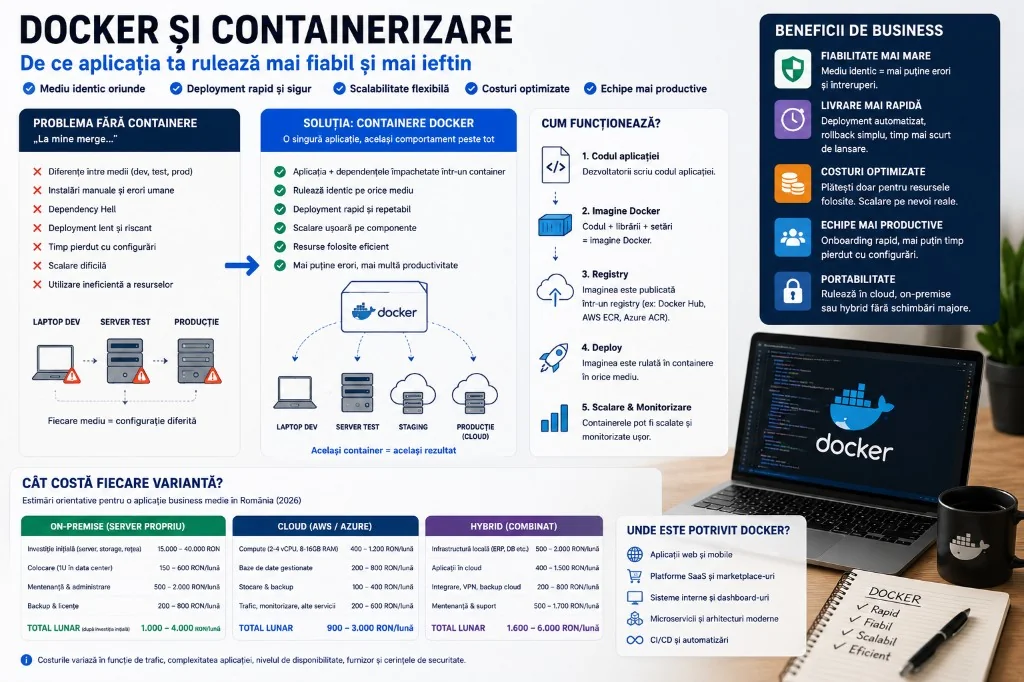
Without excessive technical jargon: what containers are, what problems they solve and why they matter for business.
For many managers, Docker and containerisation seem strictly technical topics. Terms like image, container, registry, orchestration or Kubernetes can sound like internal discussions between developers and DevOps.
But containerisation is not just a technology for programmers. It is an infrastructure decision that affects application stability, hosting costs, delivery speed, remediation time and the ability to scale.
Docker packages the application together with everything it needs to run: code, libraries, configurations and dependencies. The business result: fewer surprises, less "it works on my machine", more controlled releases and more efficient infrastructure.
In a business application — client portal, online store, financial dashboard, order platform, custom CRM or internal app — you want stability, stress-free updates, quick problem reproduction and the ability to move the application between servers without a complete rebuild. That is where Docker comes in.
The simple metaphor: the shipping container
Before standardised shipping containers, each cargo was packaged and transported differently — difficult, slow, risky. With standard containers, cargo moves between trucks, trains and ships without repackaging at every step.
Docker does something similar for software. The application is no longer installed manually on each server with different commands and versions — it is packaged in a container that runs predictably on a laptop, test environment, cloud or data centre.
The classic problem: "it works on my machine"
The developer says it works. The tester says it does not. Production does not start. The cause: different environments — Python/Node versions, missing libraries, DB configurations, environment variables.
Docker reduces this category of errors: the application comes with its own runtime environment. The team spends less time on configurations and more time on features.
Docker image vs. container
The image is the complete recipe: base system, libraries, code, commands, dependencies. The container is the running instance — backend, frontend, worker, cache, each with its role.
A team builds a verified and tested image, then runs it in multiple environments. You can roll back to previous versions and test the same image before production.
Docker vs. virtual machine
A virtual machine includes a complete operating system — powerful, but heavy. A container is lighter: it isolates the application and dependencies, using the host system.
Metaphorically: the VM is a complete apartment; the container is a standardised room in an organised building. Result: better used resources and potentially better hosting costs.
Why the application runs more reliably
Reliability comes from predictability. The runtime environment is defined in code, not from forgotten manual installations.
- safer deployment;
- testing closer to production;
- faster onboarding;
- easier bug reproduction;
- simple rollback;
- component separation;
- easier migration between servers or cloud.
Why it can be cheaper
Docker does not reduce costs by magic. If the application is poorly built, containerisation does not automatically make it cheap. But in a well-designed architecture, the benefits are real:
- Resources: containers are lighter than virtual machines — more services on the same infrastructure;
- Team time: fewer hours lost on environment problems;
- Automation: repeatable deployment pipelines with clear steps;
- Selective scaling: only the API or only the workers, not the entire server;
- Portability: easier move between own server, cloud or hybrid.
Real costs depend on architecture, traffic, databases, storage, backup and monitoring. Docker provides the foundation for a more efficient way of operating.
Docker Compose: the complete application in one configuration
A web application can have backend, frontend, database, cache, workers, email, file processing. Docker Compose defines them in one file — the entire system starts locally with one command, without manual installations for each service.
Onboarding, deployment and scaling
Onboarding: without Docker, a new developer can lose a day on setup. With containers, they clone the project and start the environment much faster.
Deployment: image built, tested, run in production; rollback to the previous image if needed — no improvisation on critical systems.
Scaling: API, notification workers, reports — separate components. Kubernetes handles advanced scaling; for many SMEs, Docker Compose is sufficient at the start.
Docker, cloud and security
Containers run on AWS, Azure, on-premise or hybrid — portability without total dependence on one provider.
Security does not come automatically: updated images, vulnerability scanning, no passwords in the image, secrets managed correctly, minimum privileges, log monitoring, separate dev/staging/prod environments.
What Docker does not solve
- poorly written code;
- lack of backup;
- scaling without correct architecture;
- lack of monitoring;
- a slow database just through containerisation;
- replacing complete architecture or security.
Docker is a packaging and standardisation tool — value appears with CI/CD, testing, backup and mature maintenance.
When do you need Docker?
Suitable for: custom web applications; multiple services; consistent environments; automated deployment; cloud; scaling; staging and production.
May be overkill for: simple static site; team without competence; old monolith without analysis. Introduce it for real problems, not just because it is trendy.
Docker in an INITWIN project
In a custom software project, Docker can be used from the first stage for a more stable foundation:
- application split into clear services, each with a Docker image;
- local environment defined through Docker Compose;
- automated tests in the pipeline;
- staging with images similar to production;
- automated deployment, centralised logs, separate backup;
- periodic image scanning for vulnerabilities.
For the client, these details are not necessarily visible. The effects are felt: safer launches, fewer errors, faster intervention, easier to maintain application.
Example: portal, admin, notifications, ERP
Without Docker: everything on the same server, manually — works at first, then different versions, risky deployment, bugs hard to reproduce.
With Docker: backend, frontend, notification worker, reports, managed DB, documented configurations, deployment through images — clear structure, easy to extend.
Questions a manager should ask
- Does it run the same in dev, staging and production?
- Is deployment automated?
- Can we quickly roll back to a previous version?
- Can a new developer start the project easily?
- Do we have versioned and scanned images for vulnerabilities?
- Where do we store secrets? Do we have logs and monitoring?
- What happens if a container goes down? How do we backup?
Costs: savings and expenses
Savings: less time on configurations; fast deployment; onboarding; predictable maintenance.
Expenses: initial setup, Dockerfile, Compose, CI/CD, monitoring, training, orchestration if needed.
Worth it when the application is important enough that stability and delivery matter — a threshold quickly reached in business applications.
Frequent mistakes
- everything in one container, without service separation;
- persistent data not managed — containers are recreated, data stays in volumes and backup;
- passwords and keys directly in the image;
- outdated base images;
- containers with unnecessary privileges;
- lack of logs and monitoring;
- Kubernetes introduced too early when Docker Compose would be sufficient;
- Docker treated as a replacement for architecture;
- undocumented build and deployment process.
Conclusion
Docker and containerisation make the business application more predictable, easier to deliver, move and operate. For managers: fewer launch surprises, faster troubleshooting, easier onboarding.
It does not replace security, backup or monitoring. Used correctly, it is one of the most useful practices for modern web applications.
In business, reliability is not a technical detail. It is the difference between an application that can grow and one that becomes hard to maintain after the first months. Docker turns the application into a clearer, more portable and easier to operate package.
Keep reading
- Why do my emails go to spam? Complete guide to SPF, DKIM, DMARC and server reputation
- How to build your own company email server with Mailcow, without monthly per-user subscriptions
- How to prepare your team for new software: training, adoption and resistance to change
- The 8-week MVP: how to launch a product idea without burning the budget
Need guidance on a similar project or a technical audit?