INITWIN · Editorial
Software & digital strategy
Backup and disaster recovery for business applications: how often you lose data without knowing
The 3-2-1 strategy, RTO vs RPO explained simply and why an untested backup will not save you
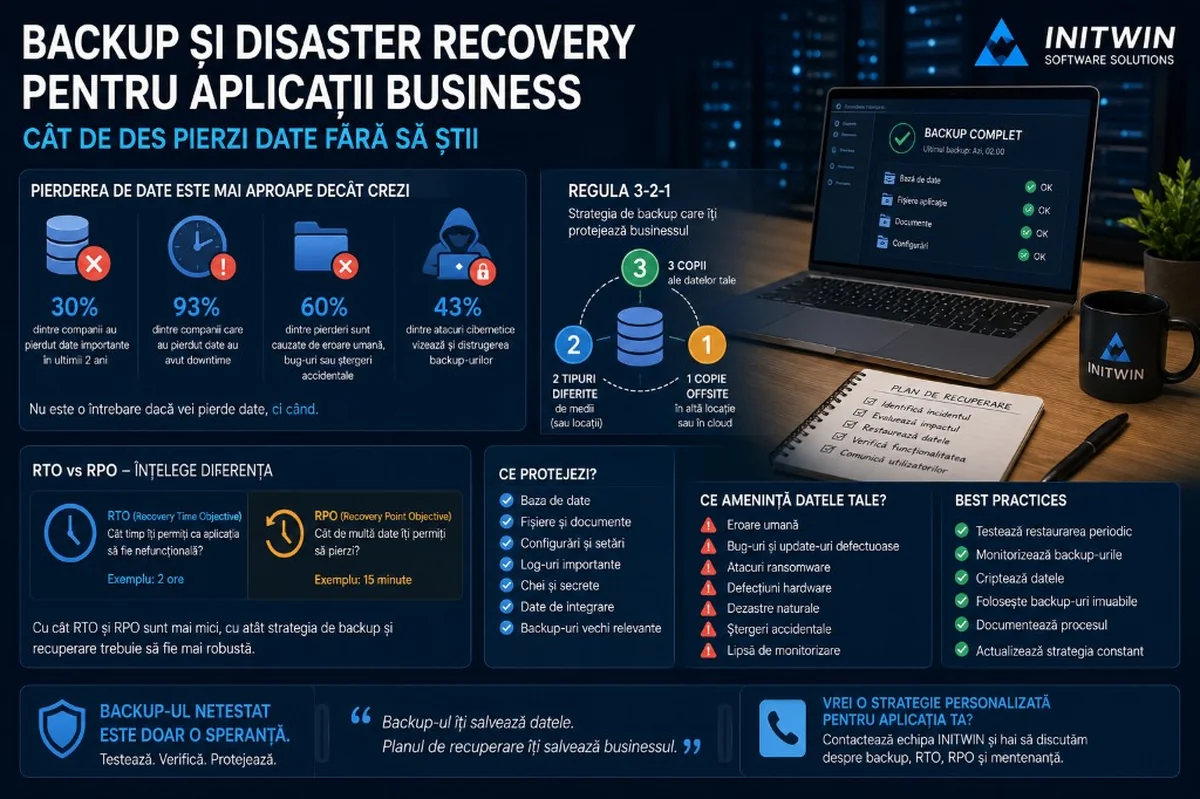
The 3-2-1 strategy, RTO vs RPO explained simply and why an untested backup will not save you.
For many companies, backup is one of those topics that seems resolved until the day you actually need it.
The application runs. The server responds. The database works. Clients log in. Orders come in. Invoices are issued. Documents are uploaded. Everything seems fine.
Then a problem appears.
An employee accidentally deletes a set of data. An update corrupts a table. A script runs incorrectly. A server goes down. A ransomware attack encrypts files. An integration imports incorrect data. A backup turns out to be incomplete. A critical application no longer starts. And then you discover that the question was not "do we have a backup?", but "can we restore quickly, completely and safely?"
This is the difference between backup and disaster recovery. Backup means having copies of data. Disaster recovery means having a real plan through which the business can return to operation after an incident.
For business applications, this difference is essential.
Why data loss is not always visible immediately
When we think of data loss, we imagine a dramatic incident: server destroyed, cyber attack, database completely deleted. But many data losses are more subtle.
You can lose data without noticing immediately.
A user deletes an important record and the problem is discovered two weeks later. A wrong import overwrites correct data. A bug saves incomplete values. A critical field stops updating after a change in the application. A financial report relies on corrupted data. Documents uploaded by clients disappear from storage, but nobody checks until they are needed.
This is one of the biggest risks: silent data loss.
If backups are kept for only a few days and the problem is discovered after a month, all available copies may already contain the wrong data. At that point, the backup exists, but no longer helps enough.
That is why a good strategy is not limited to "we do a daily backup". It must account for retention, integrity, testing, monitoring and the type of data protected.
Backup is not the same as synchronisation
A frequent mistake is confusing backup with synchronisation.
If you have files in a folder synced to the cloud, that does not automatically mean you have a backup. If someone deletes the file, the deletion can sync everywhere. If ransomware encrypts files, the encrypted versions can sync quickly. If a database is corrupted, the corruption can reach replicas or synced copies.
Synchronisation is useful for access and collaboration. Backup is useful for recovery.
A good backup must allow returning to a previous state that is verifiable and protected. You must be able to say: "I want to recover the database from yesterday at 23:00" or "I want the documents from 7 days ago, before deletion".
For business applications, synchronisation without backup can create a false sense of security.
What data must be protected in a business application
A business application does not contain only code. Code can be rewritten, the repository can be cloned, the interface can be rebuilt. Data is the truly critical part.
The following must be protected:
- the database;
- files uploaded by users;
- generated documents;
- invoices;
- contracts;
- images;
- important logs;
- application settings;
- server configurations;
- keys and secrets;
- audit data;
- exported reports;
- integration data;
- relevant old backups.
In many applications, database backup alone is not enough. If users upload documents, images, PDFs, CMRs, contracts, recipes, medical files or legal documents, these may be stored separately from the database. If you back up only the database, you will recover the records but not the files.
A complete strategy must include all components that make the application functional.
The most common causes of data loss
Not all incidents are sophisticated attacks. Many losses occur for simple reasons.
The first cause is human error. Someone deletes, modifies or imports data incorrectly. In internal applications where users have access to administrative operations, this risk is high.
The second cause is software bugs. A new feature may save incorrect data, overwrite fields or trigger unexpected behaviour.
The third cause is failed migration. When the database structure changes or data is imported from an old system, losses, duplicates or broken relationships can appear.
The fourth cause is infrastructure. Faulty disks, failed servers, cloud problems, configuration errors or lack of space can affect the application.
The fifth cause is cyber attack. Ransomware, unauthorised access or compromised credentials can affect both production data and backups.
The sixth cause is lack of monitoring. Backup can fail for days or weeks without anyone noticing.
That is why backup must not be treated as a script forgotten on the server. It must be monitored like any critical component.
The 3-2-1 rule explained simply
The 3-2-1 rule is one of the best-known backup strategies. It is simple and easy to understand:
- 3 copies of the data;
- 2 different types of media or storage locations;
- 1 offsite copy, meaning outside the main location.
In practice, this can mean:
- live data in the application;
- a local backup or one in separate storage;
- a backup in an external location or separate cloud.
The goal is not to depend on a single copy, a single server or a single location.
If the main server goes down, you have another copy. If local storage is compromised, you have an offsite copy. If an incident affects the main infrastructure, you have a recovery option.
For modern applications, the 3-2-1 rule is often extended with ideas such as immutable backup and automatic verification. Immutable means the backup cannot be modified or deleted for a set period, not even by an attacker who has compromised administrative accounts. Verification means the backup not only exists, but is tested and confirmed as recoverable.
Immutable backup: why it matters in the ransomware era
Modern ransomware attacks do not target only production data. Attackers often try to destroy backups before demanding payment. If backups are accessible from the same compromised account, they can be deleted or encrypted.
That is why immutable backups have become very important.
An immutable backup is protected against modification or deletion for a set period. Even if someone gains access to the system, they cannot remove those copies before the period expires.
For critical applications, immutable backup can make the difference between a controlled restoration and a total crisis.
Not all companies need very complex enterprise infrastructure, but any application that manages important data should have at least one copy protected against accidental or malicious deletion.
RTO and RPO: two concepts every manager must understand
Backup and disaster recovery cannot be discussed seriously without two concepts: RTO and RPO.
RTO stands for Recovery Time Objective. In short: how long can you allow the application to be unavailable?
RPO stands for Recovery Point Objective. In short: how much data can you afford to lose?
These two questions completely change the backup strategy.
If you have a blog or a presentation website, you may be able to tolerate it being offline for a few hours and losing changes from the last day.
If you have an active online store, you may not be able to afford losing orders from the last 12 hours.
If you have a transport application where statuses, documents and trips are updated in real time, RPO may need to be minutes, not days.
If you have a medical or financial application, tolerance for loss can be very small.
RTO and RPO must be set based on the business, not only on technology.
A simple RTO and RPO example
Suppose you have a B2B order application.
If RPO is 24 hours, it means you theoretically accept losing data entered in the last 24 hours. For many companies, this is unacceptable. It would mean lost orders, missing documents, wrong statuses and manual reconstruction work.
If RPO is 1 hour, backups or recovery mechanisms must be frequent enough that you do not lose more than one hour of data.
If RTO is 8 hours, it means the application can be offline for up to a working day. If RTO is 30 minutes, you need much more serious infrastructure and processes.
The smaller the RTO and RPO you want, the more expensive and complex the strategy becomes.
That is why there is no universal solution. There is the right solution for each application's risk and budget.
Is daily backup enough? It depends.
For some applications, daily backup may be enough. For others, it is dangerous.
If the application has few changes and data is not critical, a daily backup may cover the main risk.
But if the application processes orders, payments, documents, appointments, contracts, case files, statuses or important messages, a daily copy can mean significant losses.
The right question is: what happens if we lose everything entered since the last backup?
If the answer is "we can easily rebuild manually", daily backup may be acceptable.
If the answer is "we do not know exactly what was lost", the strategy is weak.
If the answer is "the business stops", you need more frequent backups, replication, point-in-time recovery or advanced recovery mechanisms.
Point-in-time recovery: the lifeline for active databases
For applications with active databases, point-in-time recovery is very important. It means the ability to restore the database to a precise moment in the past.
For example, if at 14:35 a wrong script deleted data, you can go back to 14:34, not only to last night's backup.
This functionality is very valuable for applications with frequent changes. It reduces data loss and allows more precise recovery.
However, point-in-time recovery must be configured, monitored and tested. It must not be assumed to exist automatically just because you use a modern database or a cloud service.
Restore test: an untested backup is only hope
The biggest mistake is making backups but never testing restoration.
A backup can exist but be corrupted. It can be incomplete. An important component may be missing. It may take too long to restore. It may require passwords or keys that nobody has anymore. It may save the database but not the files. It may restore data but the application may not start due to missing configurations.
That is why testing restoration is mandatory.
A restore test should verify:
- whether the backup can be downloaded;
- whether it can be decrypted;
- whether the database can be restored;
- whether files are present;
- whether the application starts;
- whether users can log in;
- whether recent data exists;
- whether documents open;
- how long recovery takes;
- which steps are manual;
- what problems appear.
Testing must be done periodically, not only once at the beginning.
Disaster recovery plan: what do you do in the first 30 minutes?
A disaster recovery plan does not need to be a huge document. But it must be clear.
At the moment of an incident, you do not have time to search for passwords, ask who has access or improvise steps.
A good plan answers simple questions:
- Who is responsible?
- Who makes the restoration decision?
- Where are the backups?
- Who has access to them?
- What is the restoration order?
- Which servers must be started?
- Which external services must be verified?
- How do we communicate with users?
- How do we verify the application works?
- When do we declare the incident resolved?
For critical applications, the plan must also include contacts, escalation procedures, prepared messages for clients and clear criteria for recovery.
In a crisis, clarity is enormously valuable.
Backup must be monitored
Another frequent risk is backup failing without anyone noticing.
There may be no space left. The access key may have expired. The job may have stalled. The connection to storage may no longer work. Backup may run but save only part of the data.
That is why backup must be monitored.
There should be alerts for:
- failed backup;
- incomplete backup;
- unusual duration;
- abnormally small size;
- missing recent backup;
- encryption error;
- upload error;
- lack of space;
- failed restore test.
If nobody receives an alert, the problem can remain hidden until the day of the incident.
How much does a good backup strategy cost?
Cost depends on application complexity, data volume, backup frequency, retention, storage, encryption, monitoring and the desired disaster recovery level.
For a small application, costs can be low: automatic daily backup, cloud storage, reasonable retention and periodic testing.
For a medium business application, costs increase: database backup, file backup, offsite copies, monitoring, restore test, documentation and support.
For critical applications, additional costs appear: replication, standby infrastructure, immutable backup, point-in-time recovery, DR plan, periodic testing and SLA.
Importantly, backup must not be seen as an optional expense. It is operational insurance.
The right question is not "how much does backup cost?", but "how much does it cost to lose our data or be offline for a day?"
Backup and maintenance: the link many ignore
Backup is not a task you configure once and forget.
As the application evolves, new tables, files, services, integrations and rules appear. If the backup strategy is not updated, you can end up backing up only part of the system.
For example, initially the application had only a database. After a few months, document upload is added. If backup does not include file storage, data is only partially protected.
Then a search service, cache, reporting module or notification system is added. Each component must be analysed: does it need backup? can it be rebuilt? does it have critical data? does it matter for restoration?
That is why backup is part of maintenance. It must be checked periodically, adapted and tested.
Common mistakes in backup and disaster recovery
- Assuming the hosting company handles everything.
- Keeping backups in the same compromisable account as production.
- Not testing restore.
- Backing up only the database, not files.
- Not having enough retention for problems discovered late.
- Not encrypting backups.
- Not monitoring backup jobs.
- Not defining RTO and RPO.
- Not documenting the recovery process.
- Believing "it cannot happen to us".
Checklist for entrepreneurs
If you have a business application, ask the following questions:
- Do we have automatic backup?
- What data is included in backup?
- Are user-uploaded files included?
- How often is backup done?
- How long is it kept?
- Is there an offsite copy?
- Is there immutable backup?
- Are backups encrypted?
- Who has access to them?
- Do we get an alert if backup fails?
- Have we tested restoration?
- How long does restoration take?
- What is our RTO?
- What is our RPO?
- Is there a disaster recovery plan?
- Who executes it?
- When was it last tested?
If you do not have clear answers, you have a real risk.
Conclusion
Backup is not a technical detail. It is an essential component of business continuity.
An application can have good design, useful features and satisfied users, but if data is lost and cannot be restored, the entire project is at risk.
Data loss does not appear only in spectacular attacks. It happens through human error, bugs, wrong imports, failed migrations, weak configurations, faulty storage, ransomware or lack of monitoring. Sometimes you lose data without knowing, and when you discover the problem, good backups are no longer available.
A healthy strategy includes 3-2-1 backup, offsite copies, encryption, retention, monitoring, restore test, RTO, RPO and a clear disaster recovery plan.
For business applications, the question is not whether you will ever need backup. The question is whether, when you need it, backup will work.
And the answer must not be left to chance.
Keep reading
- Why do my emails go to spam? Complete guide to SPF, DKIM, DMARC and server reputation
- How to build your own company email server with Mailcow, without monthly per-user subscriptions
- How to prepare your team for new software: training, adoption and resistance to change
- The 8-week MVP: how to launch a product idea without burning the budget
Need guidance on a similar project or a technical audit?